

Build the Plans
Create one plan per job from the Plans tab with Add a Plan, or import ready-made ones from the Plan Library.1. Block inappropriate websites
On What to block, load the Adult Content list from the Lists: row and add anything else you want restricted. Add a Keyword entry (for exampleporn) to catch pages by title, and use Regex for broad category blocking. On When it runs, choose Weekly Schedule and click the 24/7 preset chip.
For younger children, choose Block every site except my list on the Websites tab and list only approved sites. It is the safer approach.
2. Limit gaming and social media
Create a separate plan with the games and social sites as targets. On When it runs, set the interval’s rule mode to Time Limit — for example Allow 1 h per Day — or Session Limit to stop compulsive checking. See Rule Modes.3. Enforce bedtime
Create a plan, set Plan blocks to Block entire computer, and give it a Weekly Schedule from, say, 9pm to 7am every night. The computer is unusable during those hours. See Block your PC at night.4. Enforce screen breaks
Create a plan whose interval uses Screen Break — for example Break every 45 m for 10 m. See Screen Breaks.Protect the Plans
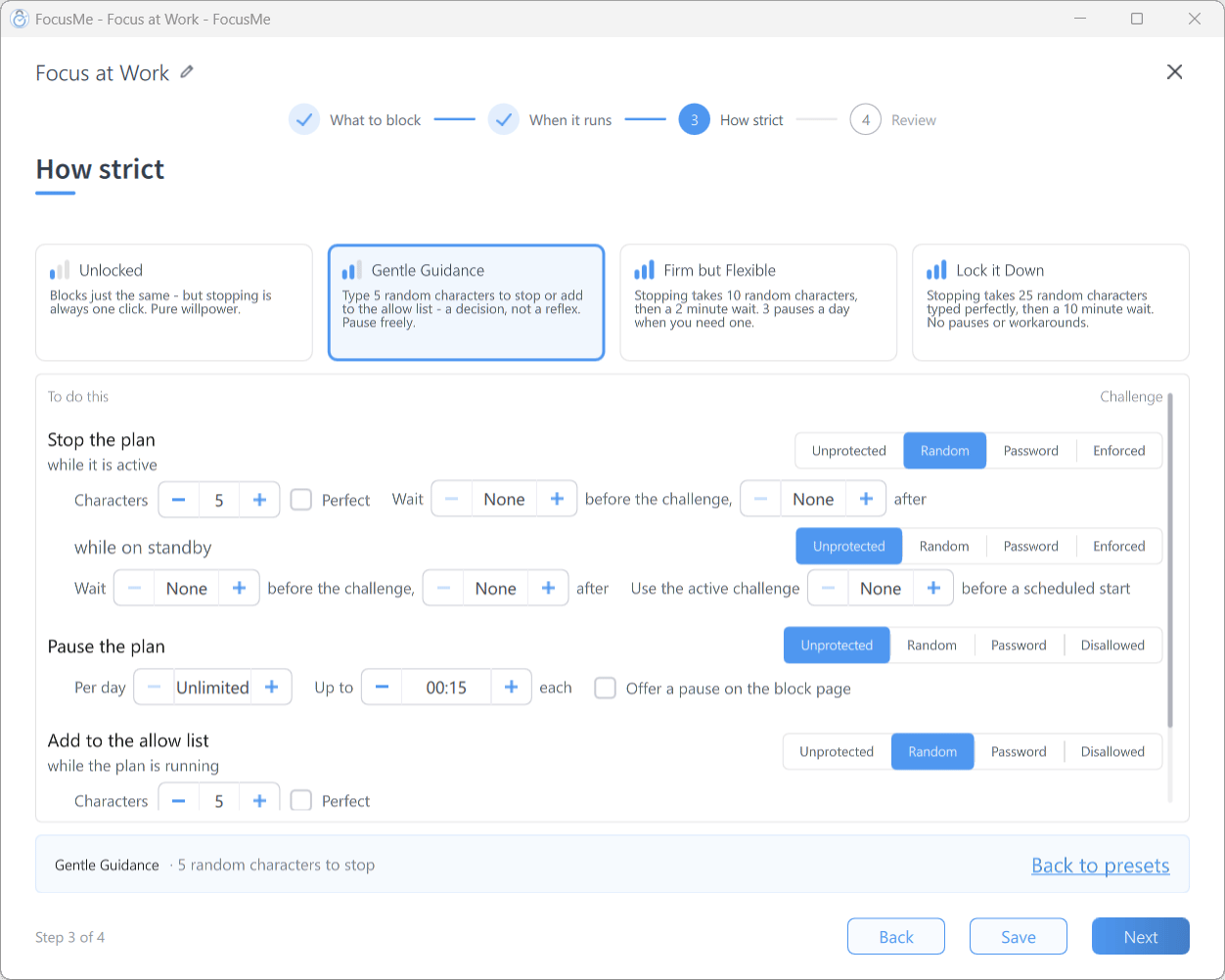
Step 3 How strict after clicking Customize — set each challenge individually
Don’t tick Partner can approve on any row, and don’t use Random — a determined teenager will type 25 characters.
Lock Down FocusMe
Plan protection stops the plans being changed. The settings below stop your child changing FocusMe.Master Password
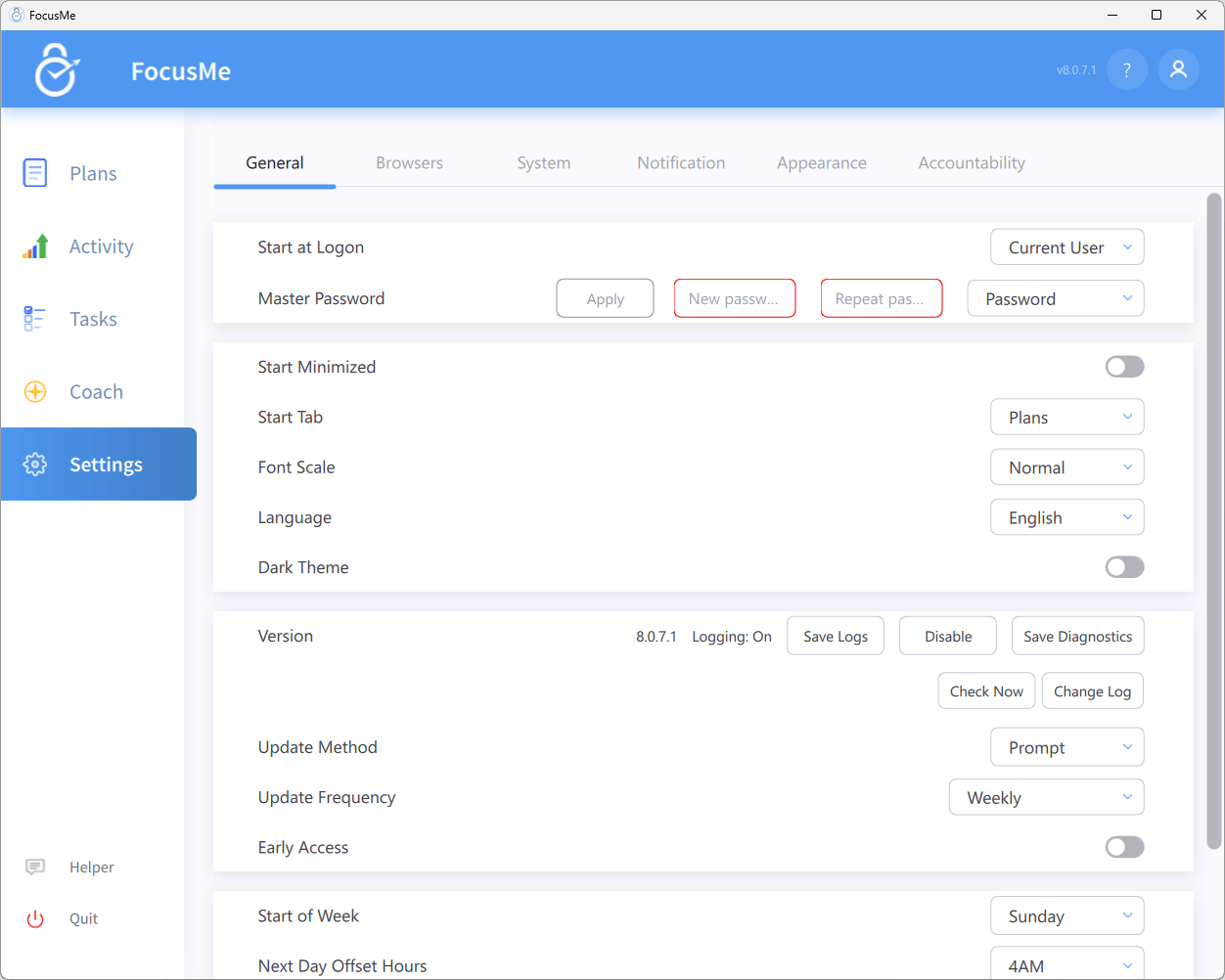
Setting a Master Password in Settings → General
Share settings and restrict logons
Also in Settings → General:- Share Settings for All Users — apply the same settings and plans to every user account on the computer (requires administrator privileges). With it on, Start at Logon must be All Users, so FocusMe starts whichever account is used.
- Restrict Logon of Users — shown once settings are shared. Turning it on opens the Allowed User Accounts dialog; only the accounts you tick can log in, so a child can’t switch to a spare account to escape the plans. It can’t be turned off while any plan is enabled.
- Protect Guest Account (macOS) — protects the macOS guest account.
System protections
In Settings → System, turn on the protections that close the usual workarounds:- Protect FocusMe Process and Protect FocusMe Configuration — restart FocusMe if it’s ended and guard its files.
- Block Task Managers and Block Terminals — block the tools most often used to end FocusMe.
- Use Internal Clock & Get Time from Internet — stops schedule tricks by changing the computer’s clock. If you’d rather not, use Block Date & Time Changing and Block W10/W11 PC Settings.
- Protect Switch User and Protect Sign Out (Windows and Linux) — prevent switching accounts or signing out to dodge a plan.
- Protect Uninstall and Block 3rd Party Uninstallers — FocusMe can’t be removed while plans run.
- Protect Activity — the child can’t clear or disable the Activity history you use to check up on things.
- Extra Protection Service (Windows, administrator installs) — click Enable to have FocusMe restarted automatically if it is closed, and its files guarded. With it enabled, Run in Safe Mode also launches FocusMe when Windows starts in Safe Mode.
Several of these can’t be switched off while a plan is enabled, and the Master Password stops your child reaching them at all.
Tips
- Install FocusMe on the child’s own account with Share Settings for All Users, and give them a standard (non-administrator) Windows account.
- Check the Activity tab to see where their time went and what was blocked — see Activity.
- Start lenient and tighten. Let them earn more screen time through good behaviour rather than starting with maximum restriction; a Time Limit is easier to live with than a 24/7 block.
- Keep an escape hatch you control. Prefer Password to Enforced on anything you might need to lift, and keep the password somewhere safe.