

Pause from the Plans List
- Open FocusMe and find the running plan
- Click its stop button and choose Pause from the small popup (or right-click the plan and choose Pause)
- In the Pause plan? dialog (Would you like to pause “Plan”?), check how many pauses you have left (or Unlimited pauses) and set Pause for:, the length of the pause
- Complete the plan’s pause challenge if it has one (random characters or a password). Random characters pause the plan as soon as they match; otherwise click Pause. Cancel closes the dialog without pausing
On plans that block the entire computer, screen breaks for example, the command is called Postpone rather than Pause. The dialog reads Postpone break? with Postpone for: and a Postpone button. It delays the next break and follows the same limits and protection.
Pause from the Block Page
If the plan has Offer a pause on the block page turned on, the notification that tells you something was blocked has a Pause plan button. Click it to open the pause dialog: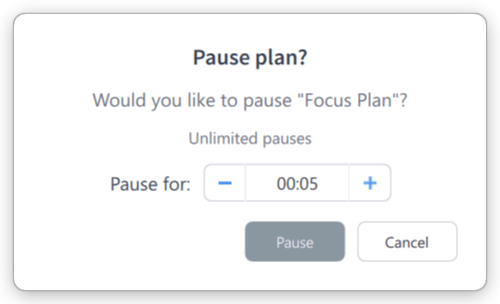
The Pause plan? offer
Pause Limits
How often and how long you can pause is part of the plan’s protection preset:
To set your own limits, click Customize on the How strict step. The Pause the plan row has:
- The pause challenge — Unprotected, Random, Password, or Disallowed
- Offer a pause on the block page
- Per day — the maximum number of pauses per day
- Up to … each — the maximum duration of each pause
If the pause row has Partner can approve ticked and you have an accountability partner, the pause dialog also offers Request Partner Approval. Your partner is asked for the length you set, and can approve by email or give you a code to enter. If they approve after you’ve closed the dialog, the pause starts by itself.
Resume or Pause Again
Click a paused plan’s button to resume it straight away, or right-click it to see:- Resume — end the pause now and start blocking again
- Pause Again (or Postpone Again) — take another pause, if you have any left
- Stop — stop the plan entirely, completing its stop challenge
Pause vs Stop
Pausing is the safer option: you know blocking will return.