

Requirements
FocusMe runs on Windows 10 and later (64-bit). Download it from focusme.com/download/win.Installation
Two installers are available:
The standard installer offers a few optional components: shortcuts for all users, Share Settings for All Users, removal of old installer copies it finds lying around (a common way of downgrading around plan protection), and opening this documentation site when it finishes.
When you install a newer version over an existing one, the installer skips the licence-agreement page and keeps your settings and plans.
Downgrade prevention
Running an older installer over a newer version is refused while plans are enabled: A newer version of FocusMe is already installed. Installing an older version is not possible while plans are running. With no plans enabled you are asked to confirm the downgrade. See Update FocusMe.System Tray
FocusMe lives in the notification area. Right-click the icon for: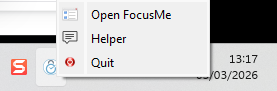
The FocusMe tray menu
Closing the main window does not quit FocusMe; blocking continues from the tray.
Protection Settings on Windows
Settings → System includes several protections that only exist on Windows:
Most of these can only be turned off when no plans are enabled.
Windows-Only Blocking Options
- Network block — a website action (wizard → Advanced → Blocking behaviour) that stops the site loading at the network level instead of closing the tab. Needs the standard (admin) installation. See Blocking Websites.
- Hide — an application action that hides the window instead of closing it.
- Windows Store apps — Store apps share a host process, so add them by Application Name or window title, or pick them from the Open Windows tab while they are running. FocusMe warns you with Windows System Process if you try to add the host process itself. See Block Windows Store Apps.
Troubleshooting
FocusMe won’t start
- Look for the tray icon — the window may simply be hidden; the Start Minimized setting does this on purpose
- If you enabled the Extra Protection Service, wait a few seconds; it relaunches FocusMe automatically
- Reinstall over the top with the same installer — settings and plans are kept
Websites not blocked in a specific browser
- Install the browser addon for that browser from Settings → Browsers
- Make sure the browser is not on the plan’s allow list
- Raise Addon Verification so a browser without the addon is not left open