

From the Context Menu
- Open the FocusMe main window
- Right-click the running plan (or click its ⋮ button)
- Choose Add Site to Block List or Add App to Block List. The list name follows the plan’s rule mode — on a Time Limit plan the item reads Add Site to Limit List
- In the Quick Add to Block List dialog, pick the target type and match, type the value, and click Accept
From the Helper Window
The Helper shows every open window and browser tab, so you don’t have to guess a process name or URL:- Open the distracting site or app
- Click Helper in the sidebar (or right-click the tray icon → Helper)
- Find the window in the list. Either right-click it and choose Add to plan…, or expand its details and click the + that appears beside the value you want to use — for example the URL or the Process Name
- In the Add to Plan dialog, choose the plan, pick Block list or Allow list, check the target type and match, and click Accept
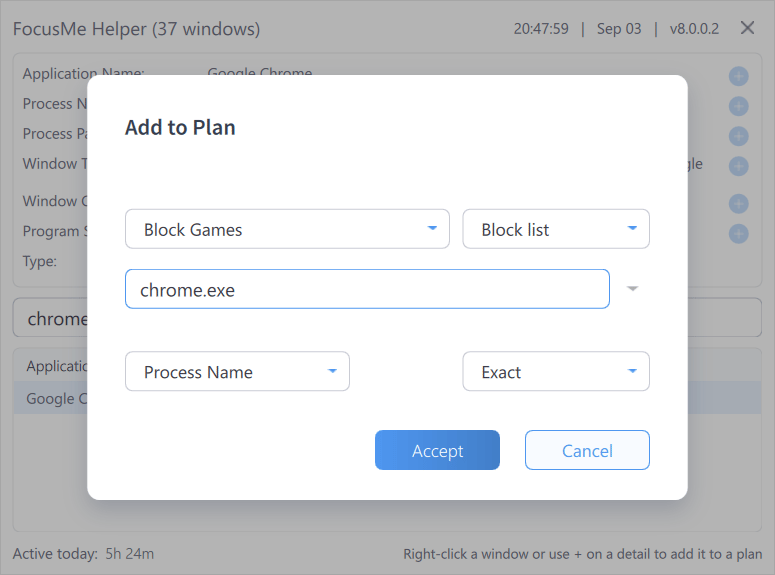
Adding a target to a plan from the Helper
about: or chrome:// URLs) and FocusMe’s own block page can’t be added. See Using the Helper Tool for everything else the Helper can do.
Adding to the Allow List
Adding an exception to a running plan weakens it, so FocusMe only allows it when the plan’s Add to the allow list protection is set:- The Add Site to Allow List / Add App to Allow List items appear in the context menu of a running plan only when that protection is set. The Gentle Guidance preset uses a 5-character challenge, Firm but Flexible 12 characters, and Lock it Down disallows it entirely
- In the Helper’s Add to Plan dialog, choosing Allow list for a running plan whose allow-list protection is not set shows The allow list of an enabled plan can only be edited if allow list protection is set
- Where it is set, you complete the Edit allow list? challenge (random characters or a password) before the entry is added
Allowing for a Limited Time
When you add a website or app to the allow list of a plan that is on, the dialog shows Allow for: 15 min, 30 min, 1 hour, 2 hours, 4 hours, 8 hours, 12 hours or Permanent. A temporary entry is removed on its own when the time is up, and you get a notification: Allowed for a limited time, now ended: …. In the plan wizard the entry shows until and the time it ends. The same choice appears beside Add in the plan wizard when you add to the allowed list of a running plan whose changes a partner approves. The change summary the partner sees gives the length, for example Added to allowed websites for 2 hours: chatgpt.com. Each plan can set the longest time an entry may be allowed for while it runs: open the plan, click Advanced, view the Allowed list, and set Allow for at most in Blocking behaviour (Off, or 15 minutes up to 12 hours). With a maximum set, Permanent and anything longer are not offered while the plan runs. Websites and applications each have their own maximum. While a protected plan runs, the maximum can be shortened but not lengthened or turned off. Moving your computer’s clock does not keep a temporary entry: FocusMe checks the time with an internet time server.Every computer that runs the plan needs an up-to-date FocusMe for temporary entries. Editing the plan in the phone app or in your web account can make a temporary entry permanent.
Duplicates and Cross-List Entries
Both dialogs check the entry before adding it:- Duplicate target - this entry already exists in the list — the entry is already there
- Already on this plan’s allow list, which takes priority. — adding it to the block list would do nothing, because the allow list always wins. Click Move to block list to move it across
- Already on this plan’s block list. — the reverse case, with Move to allow list. On a running plan this move isn’t offered from the dialog (it would loosen the plan); you’ll see Already on this plan’s block list - remove it there first and can make the change in the wizard instead
Adding to the block list never asks for a challenge. If the plan’s Loosen or delete the plan challenge is set, you’ll be asked to complete it before adding to the allow list.