

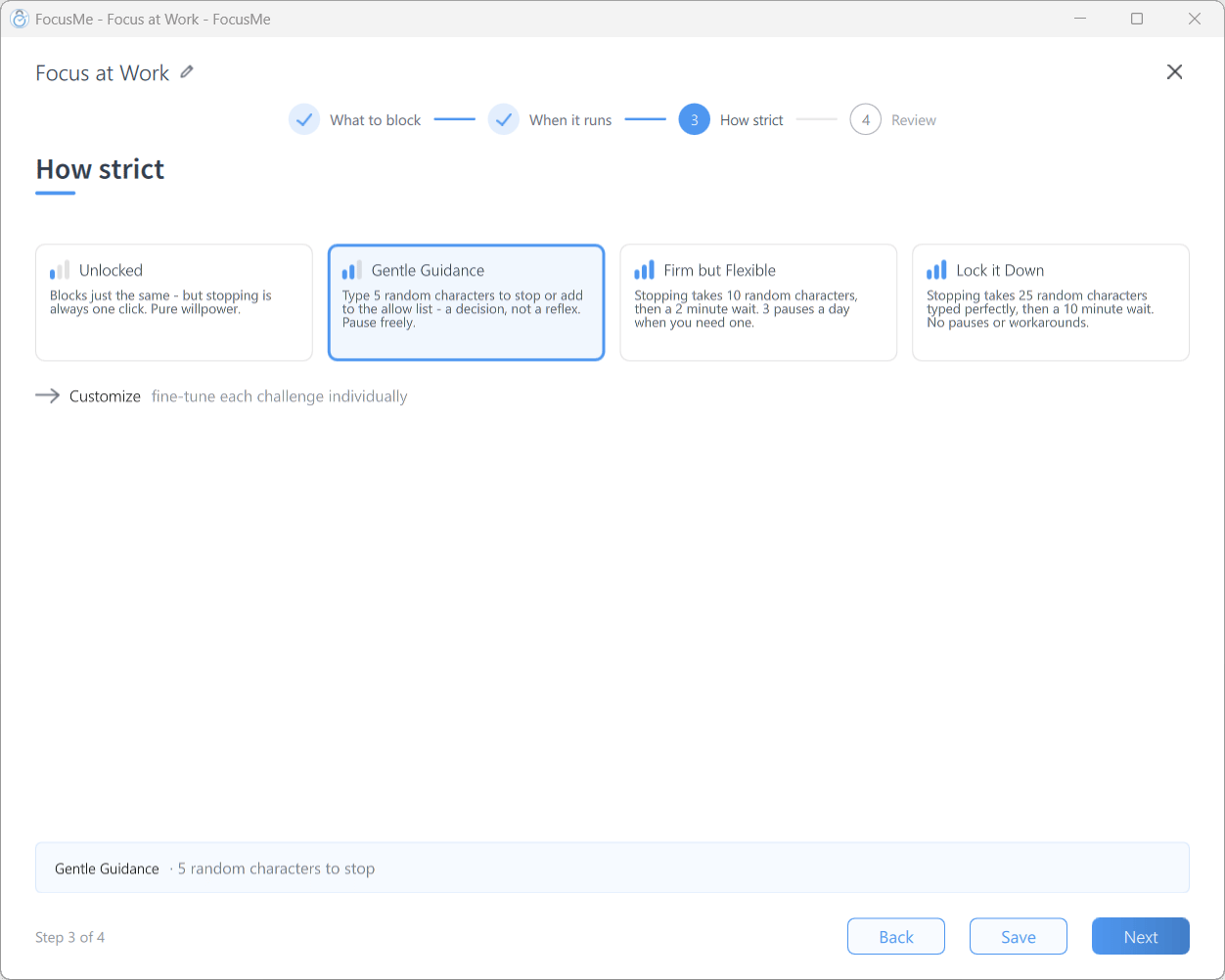
Step 3 How strict — pick a preset, or Customize
Rung 1: Gentle Guidance
New plans start here. Stopping, adding to the allow list or skipping a break costs five random characters; pausing is free. Use it when: you’re still checking that a plan’s targets and schedule are right, or you just need a moment’s reflection between the impulse and the click. What it feels like: a decision, not a reflex. You can always get out, but not by accident.Rung 2: Firm but Flexible
Stopping takes ten random characters, then a two-minute wait. Pausing costs six characters and you get three pauses a day of 15 minutes each. Adding to the allow list costs twelve characters and skipping a break costs four. Use it when: Gentle Guidance has stopped working — you’ve noticed yourself typing the five characters without a second thought. What it feels like: the wait does the work. Even after you type the characters, the plan keeps blocking for two more minutes, and you can still choose Cancel Stop. Most impulses don’t outlive that. The rationed pauses are your relief valve, so you don’t feel trapped.Rung 3: Lock it Down
Stopping takes 25 random characters typed perfectly (one typo and you start again), then a ten-minute wait. No pauses, no skipping breaks, no allow list additions. Use it when: you know exactly what the plan should do and you want stopping to stay possible but never easy. What it feels like: you can still get out in a genuine emergency, but it costs a careful minute of typing plus ten minutes of waiting. That’s enough to make “just five minutes on Reddit” not worth the effort.Rung 4: Enforced (via Customize)
Click Customize and set Stop the plan to Enforced. The plan cannot be stopped from FocusMe while it runs: no wait, no challenge, no way to stop it yourself. The only way out early is an Assisted Stop request, which someone else has to approve. Set Pause the plan, Skip a break and Add to the allow list to Disallowed to close the remaining doors. FocusMe warns you before it accepts this. On a Quick Timer: Stopping the plan will not be possible until the timer runs out. On a 24/7 weekly schedule with no end date: you will never be able to stop this plan. Use it when: you have tested the plan on Lock it Down for at least a few days and nothing needed changing. Before you commit:- Use a Weekly Schedule with gaps for the hours you genuinely need unrestricted access, or tick Set end date.
- Set the while on standby challenge and Loosen or delete the plan too — otherwise you can stop the plan outside its hours, edit it to remove protection, and restart it.
- Remember that a running plan can only ever be edited to be stricter.
Add a Master Password
Protection stops you stopping a plan, but a Master Password stops you opening FocusMe at all. In Settings → General, set Master Password to Random Chars (with a length and optional Perfect Entry) or to a Password you don’t keep to hand. Choosing Password shows New password and Repeat password fields in the same row. Click Apply to set it. Changing or removing it later takes the current one. Give it to someone you trust, or generate it in a password manager and don’t memorise it. FocusMe then asks for it before showing the main screen, and starts minimised.Add an Accountability Partner
Tick Partner can approve on a row to let a trusted person unlock it for you. Add them in Settings → Commitment with their Partner email, then use Lock Accountability Partners so you can’t quietly add a more lenient partner later. When you ask for an Assisted Stop, Request Partner Approval sends them your reason; they approve by email or give you a code. Learn more about accountability partners →Add a Commitment Fee
If waiting and typing isn’t enough, put money on it. A commitment fee in your commitment settings charges you when FocusMe support stops a plan for you — a cost you’ll only accept in a real emergency.Tips
- Escalate, don’t jump. Most people never need Enforced. A preset that lets you out at a price you rarely want to pay is the sweet spot.
- Protect standby and editing once you’re past Gentle Guidance, or the protection only holds while the schedule is active.
- Watch the tier in the Plans list. Each row shows its tier — Gentle Guidance, Firm but Flexible, Lock it Down or Custom — with a one-line summary, so you can see at a glance which plans are still on training wheels.