How FocusMe enforces your plan — Block, Time Limit, Session Limit or Screen Break — and how to give each schedule interval its own mode.
The rule mode decides what “blocked” means for a plan. You choose it on the When it runs step (Step 2) of the Plan Wizard — for a Quick Timer it applies to the whole session, and on a Weekly Schedule or Multi-Day Plan each interval on the timeline has its own mode.
Mode
What it does
Block
Targets are completely inaccessible while the interval is active
Time Limit
You get a budget of time with your targets, then they’re blocked until the period resets
Session Limit
Limits how many times you can open your targets, with a wait between sessions
Screen Break
Forces you away from the screen at regular intervals
Whenever a plan uses a mode with settings, the settings appear inline on Step 2 as a sentence you fill in.
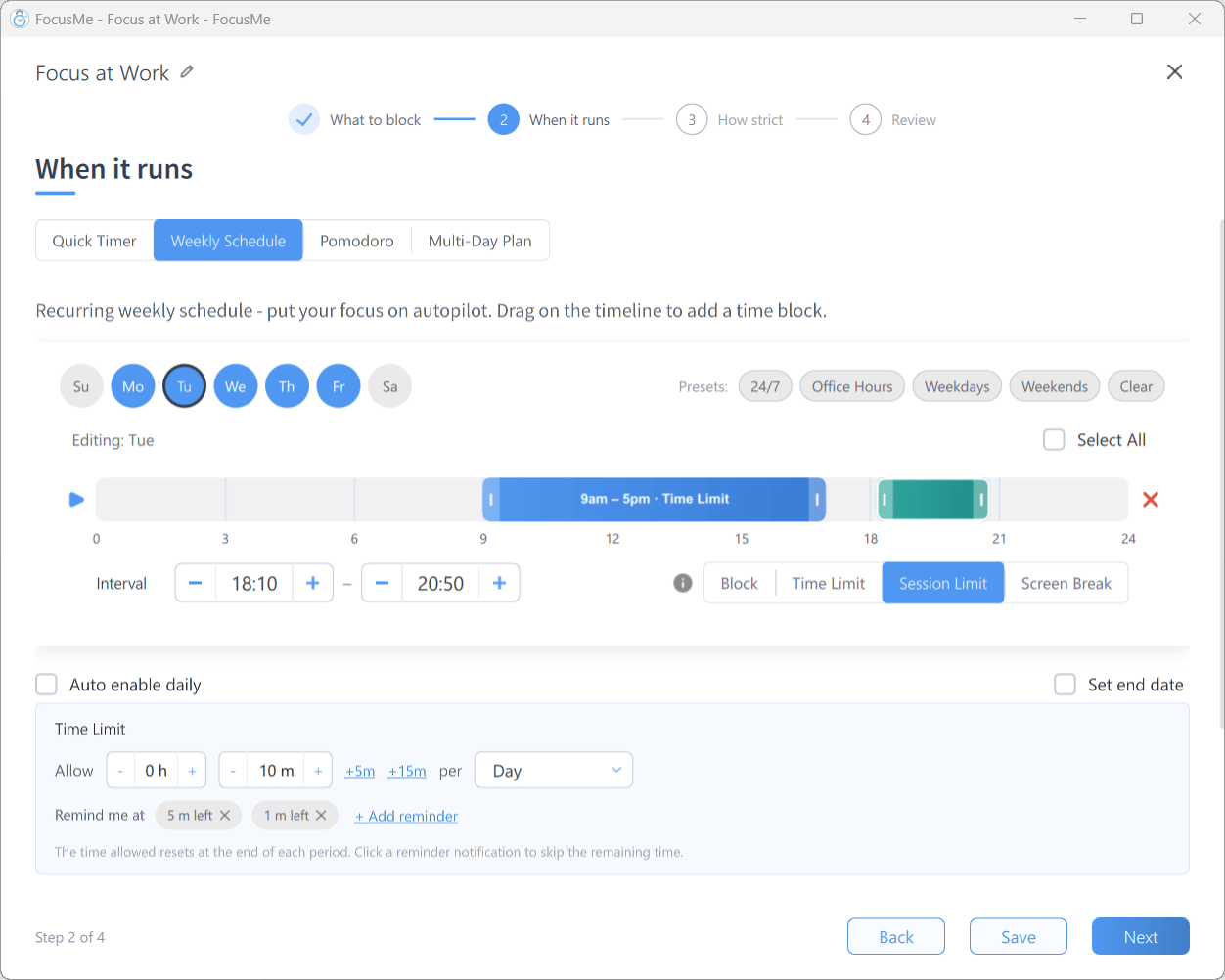
On a Weekly Schedule or Multi-Day Plan, select an interval on the timeline and use the segmented control beside it (Block / Time Limit / Session Limit / Screen Break) to set that interval’s mode. A single plan can:
Block social media completely during morning focus (9am–12pm)
allow a Time Limit of 30 minutes at lunch (12pm–1pm)
apply a Session Limit in the evening (6pm–10pm)
A weekly schedule with intervals using different rule modes
Time limits and session limits can be set to reset when each interval starts (Interval as the period), so each interval is a fresh budget. The timeline labels each interval with its mode, and the block list on Step 1 takes the mode’s name — for example Limit List for a Time Limit interval.On a Quick Timer, the Rule Mode control on Step 2 sets one mode for the whole session. Pomodoro plans always Block during focus periods.
While a plan is running, its rule mode can only be changed to Block, which is stricter than every other mode.
The simplest and strictest option. While the interval is active, all targets are completely inaccessible — no budget, no exceptions.Best for: deep work, sites or apps you never want during certain hours, parental controls.
Gives you a budget of time with your targets. Once it runs out, the targets are blocked until the period resets.
The inline Time Limit settings
The settings row reads Allow [h] [m] per [period], with +5m and +15m buttons for quick adjustments. The period can be Day, Week, Month, Interval (resets each time the schedule interval starts) or a Custom period of your own length.Remind me at lets you add reminder chips (+ Add reminder) such as 10 m left — FocusMe notifies you when that much of the budget remains, and clicking the notification skips the remaining time and starts the block early.Examples: 30 minutes of social media per day · 4 hours of gaming per week · 15 minutes of news per interval.How it works:
The interval starts and your targets are accessible; the budget counts down while you actively use them.
When the budget runs out, the targets are blocked.
When the period resets (next day, next interval, and so on), the budget refills.
Time Limit tracks actual usage, not clock time. With 30 minutes of Reddit per day you get 30 minutes of active Reddit browsing — time spent elsewhere doesn’t count.
Restricts how many times you can open your targets. Each time you switch to a blocked app or site counts as one session; each session has a maximum length, and there’s a wait before the next one can begin.
The inline Session Limit settings
The settings row reads [N] sessions per [Day / Interval] · up to [m] each · then wait [m]. Set the count to Unlimited to allow any number of sessions and rely on the session length and wait alone.Below it, End a session after [m] of inactivity ends a session early when you stop using the target, so an app left open in the background doesn’t burn a whole session. Remind me at chips warn you before a session ends; clicking the notification ends the session immediately.Example: 5 sessions per day, up to 15 minutes each, then wait 30 minutes.How it works:
Open the target — a session starts.
The session ends after its maximum length, or after the inactivity timeout.
The wait begins — the target is blocked.
The wait ends — the next session is available, if any remain.
All sessions used — blocked until the next day or interval.
Why it works: with a limited number of sessions you naturally delay opening the app until you genuinely need it, and the enforced wait breaks the “just one more minute” cycle. Unlike a Time Limit, which you can drain in one sitting, a Session Limit spreads your usage across the day.
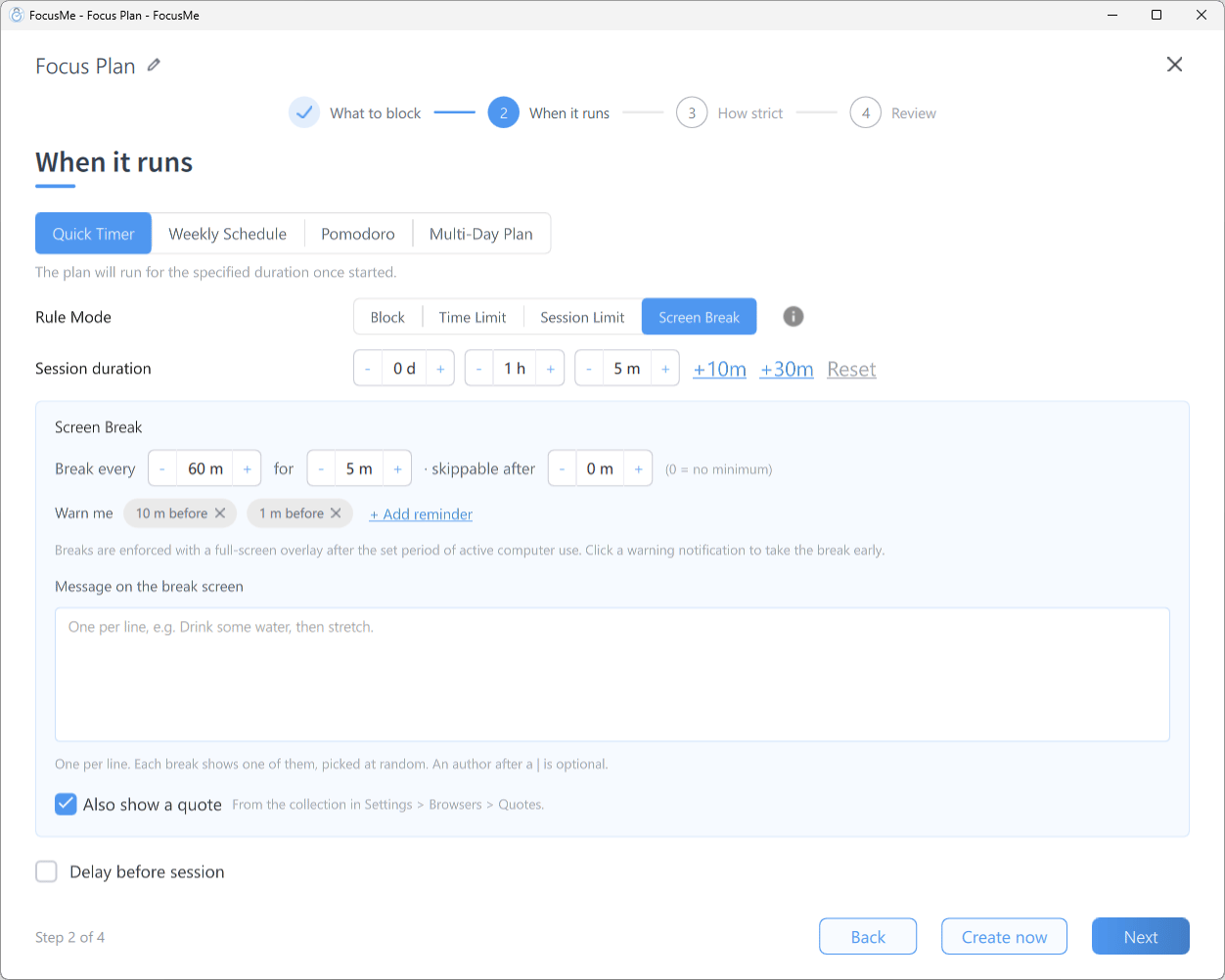
Forces you to step away from the computer at regular intervals. Screen Breaks apply to the entire computer, not to specific apps or websites.
The inline Screen Break settings
The settings row reads Break every [m] for [m] · skippable after [m] (0 = no minimum) — the last value is how much of a break must pass before the Skip Break button appears. Warn me chips (for example 2 m before) notify you ahead of each break; clicking the notification takes the break early.Under Message on the break screen you can write your own messages, one per line; each break shows one of them, picked at random. Tick Also show a quote to add a quote as well.Breaks are enforced with a full-screen overlay after the set period of active computer use — see Break Screen. Whether a break can be skipped or postponed, and what it costs, is set on the How strict step — see Plan Protection.Best for: preventing eye strain, avoiding repetitive strain injuries, keeping your energy up through the day.
Your work isn’t affected during a break — everything keeps running in the background and is exactly as you left it when the break ends.
Plans created in earlier versions with a Time Goal interval — targets blocked until you’ve spent enough time on a Goal List of productive apps and sites — keep working, and show their Goal List alongside the blocked and allowed lists on Step 1. Time Goal can’t be chosen for new intervals in the wizard.
You can mix modes across the intervals of a Weekly Schedule or Multi-Day Plan, or run separate plans with different modes — they all work independently.