

Adding partners
Partners are managed in Settings → Commitment (shown when you’re logged in).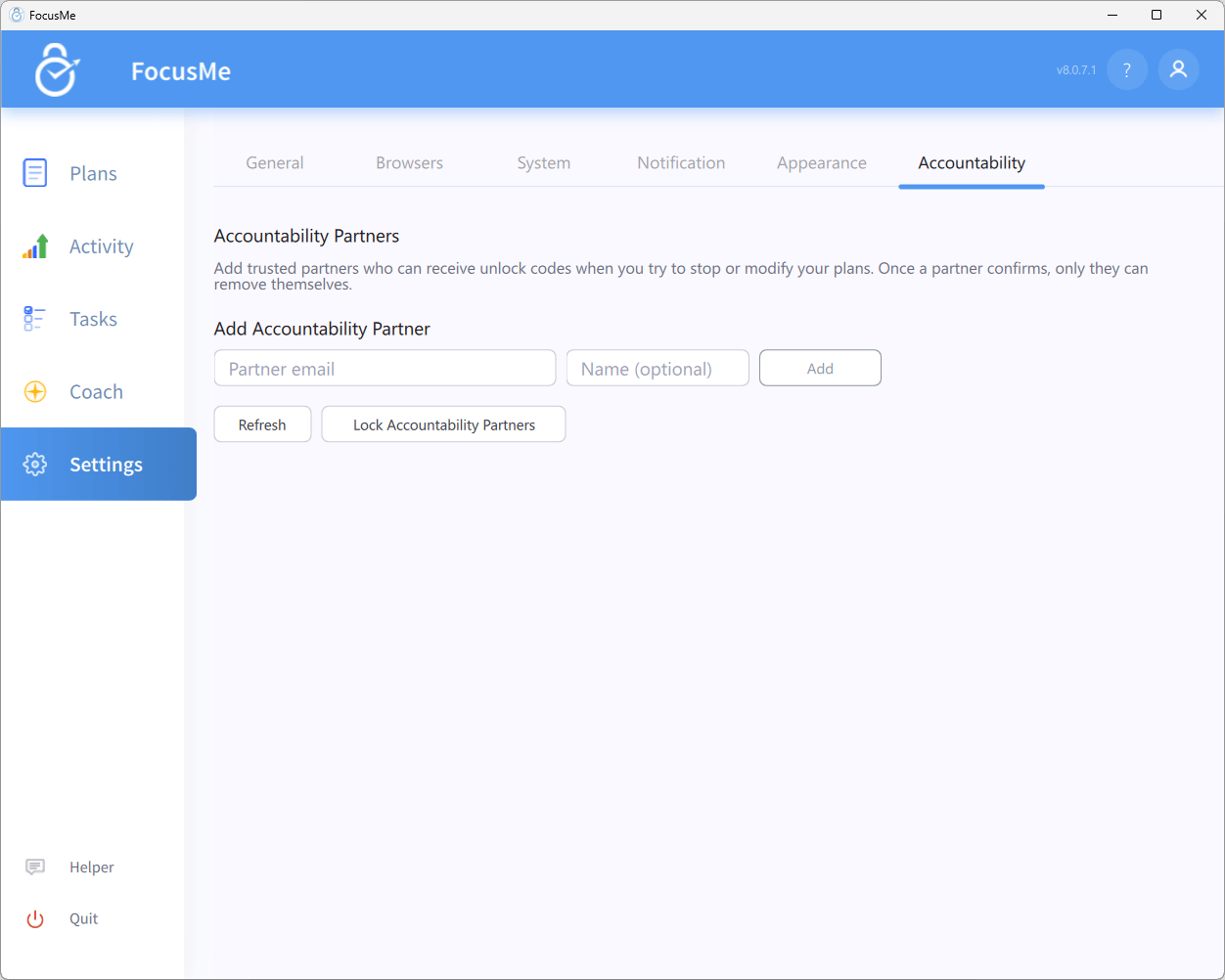
Settings — Commitment tab
- Under Add Accountability Partner, enter a Partner email and, optionally, a Name (optional).
- Click Add. FocusMe confirms Invitation sent to … Ask them to check their email and click the confirmation link.
- The partner appears in the Accountability Partners list as Pending until they confirm, then as Confirmed. Click Refresh to update the list.
The 24-hour activation delay
Partners added while any plan is running only become active 24 hours after confirming. The list shows Active in N hours - stop all plans to activate immediately, and requests you send in the meantime tell you how many partners are still in 24-hour activation period. This stops you adding a lenient partner in the heat of the moment. Stop all plans to activate the partner straight away.Removing partners
A Pending partner has a Remove button. Once a partner confirms, only they can remove themselves, using the link in their invitation email.Locking the partner list
Click Lock Accountability Partners to stop yourself from adding or removing partners until all your plans are stopped. FocusMe asks you to confirm: You won’t be able to add or remove accountability partners until all your plans are stopped. Are you sure? Once locked, the button reads Unlock Accountability Partners with the hint Stop all plans to unlock.Using partners on a plan
Partner can approve
On the How strict step of the Plan Wizard, click Customize. The table has a Partner can approve column with one box per action — Stop the plan (while it is active, and while on standby), Pause the plan / Postpone a break, Skip a break, Add to the allow list and Loosen or delete the plan. The column only appears once you have a partner. With a box ticked:- a Random or Password challenge can be handed to a partner instead of completed yourself (until you have a partner, the challenge dialog shows an Add Accountability Partner link);
- an Enforced action, which normally cannot be done at all, can be done with a partner’s approval. FocusMe explains, for example: Partner approval is required to stop “Plan”.
Approving plan edits
Tick Loosen the plan while it runs (beneath Loosen or delete the plan) to let a partner approve changes that weaken a running plan; the row reads Disallowed when off and Partner approval when on, and it can only be turned on while the plan is stopped. While the plan runs, the How strict step says This plan is running. Anything that loosens it goes to your partner for approval when you save. and the wizard shows These changes will require approval from an accountability partner before they can be applied. When you save, Partner Approval Required lists the changes (Your accountability partners must approve these changes:). Add a reason and click Request Approval from Partners. The changes are held until a partner approves, or you can type their code under Approval Code:. If you open the plan again before then, FocusMe shows Pending Approval (This plan has changes pending approval from an accountability partner.), where you can enter the code or cancel the request.The approval process
Assisted Stop
To ask your partner to stop a plan, right-click it and choose Get help with a plan (while the plan is active or on standby), or click Get help with a plan on the Break Screen.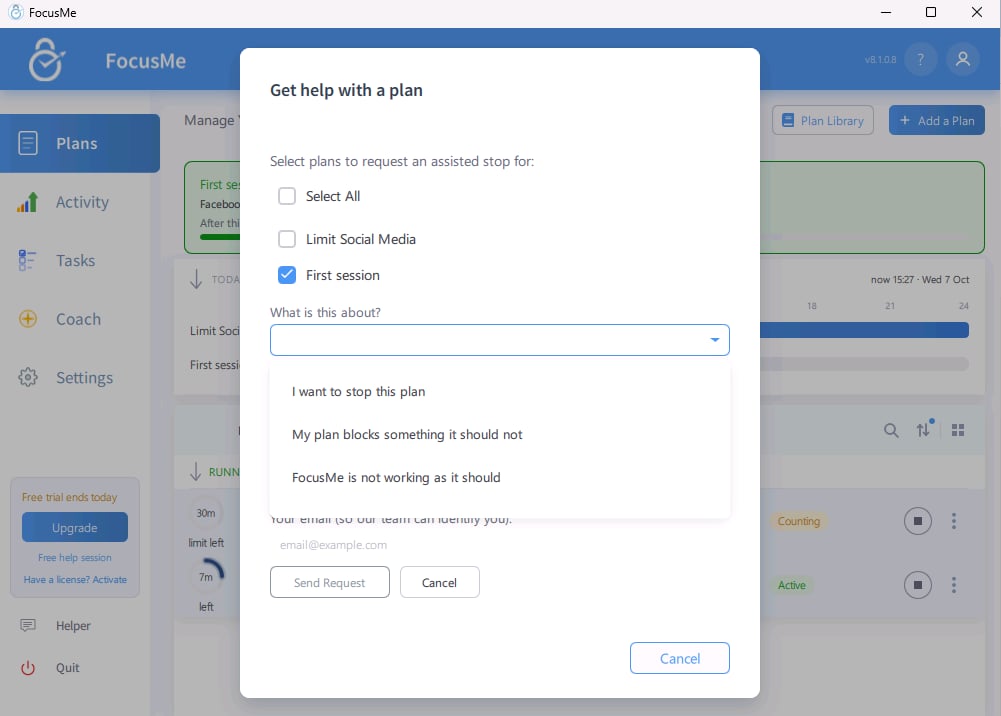
The assisted stop dialog
- Under Select plans to request an assisted stop for:, tick the plans to stop.
- Enter a Reason: for your partner to read.
- Click Request Partner Approval to send the request to your partners. (If you have no partner yet, the button reads Add Accountability Partner instead.) FocusMe confirms it, for example Request sent to 1 partner.
- Your partner receives an email with your reason and either approves or denies it.
- Approved: FocusMe shows Request Approved and the selected plans stop. A partner can also approve with a delay, in which case FocusMe says when it will happen, for example Approved with delay - plans will stop at ….
- Denied: FocusMe shows Request Denied with their reason if they gave one. The plan stays active.
- Alternatively, type the code your partner gives you under Stop Code: and click Apply.
Skipping, pausing and challenges
When a challenge appears for an action with Partner can approve ticked (stopping, pausing, skipping a break, adding to the allow list or editing), the dialog offers Request Partner Approval. You can add a reason for your partner. Then wait for their approval, or enter the code they provide. For a pause, your partner is asked for the length you set in Pause for:. If they approve after you’ve closed the dialog, the pause starts by itself and FocusMe tells you (Your partner approved a … minute pause of …). An approval with a delay says when it goes ahead.Support fallback
If you have no partner, the Get help with a plan dialog’s main button reads Add Accountability Partner. Either way, Send Request to FocusMe sends the request to our team instead. FocusMe does not provide 24/7 support, so a partner is the faster route. Our team may stop the plans, set a custom password on them, or reduce their protection to a shorter random code. The answer shows in FocusMe, not by email. A request to FocusMe asks What is this about? first: a stop, a plan fix or a fault. See Assisted Stop.Tips
- Choose someone who will say no. A partner who approves everything is the same as no partner.
- Explain your goals. Give partners the context to judge your requests well.
- Combine with Lock it Down. With Enforced stop protection and Partner can approve, your partner’s approval is the only way to stop the plan.
- Add more than one partner so a request isn’t stuck when someone is unavailable.
- Lock the list once it’s set up, so you can’t swap in a softer partner later.