> ## Documentation Index
> Fetch the complete documentation index at: https://docs.focusme.com/llms.txt
> Use this file to discover all available pages before exploring further.
# What is FocusMe?
> The distraction blocker that helps you stay focused, break bad habits, and take control of your screen time.
FocusMe is a desktop application for **Windows**, **macOS**, and **Linux** that blocks distracting websites, applications, and even your entire computer on a schedule you control.
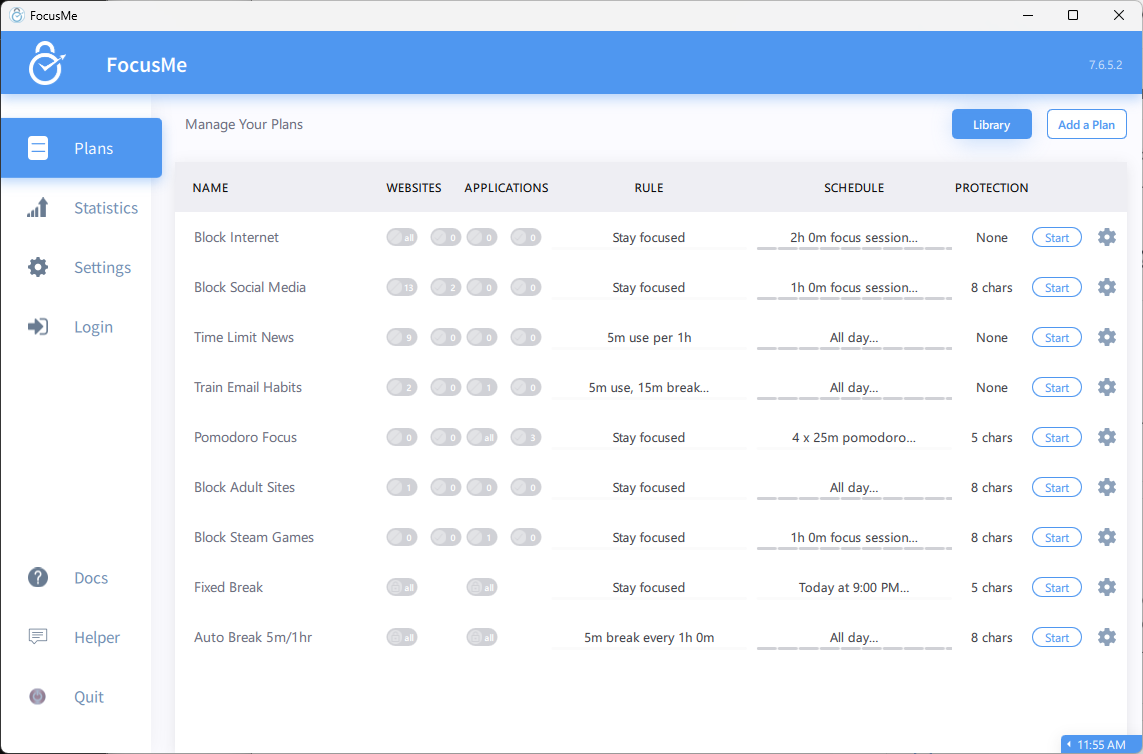 Whether you need to stay focused during deep work, limit social media, enforce screen breaks, or set up parental controls — FocusMe gives you the tools to make it happen.
## What Can FocusMe Do?
Block specific sites like Reddit or TikTok, or block the entire internet and whitelist only what you need.
Block any desktop application — games, messaging apps, browsers, or anything else that pulls your attention.
Allow yourself a daily budget of distraction time (e.g., 30 minutes of social media per day) and FocusMe enforces it.
Automatically lock your screen at regular intervals to protect your eyes and prevent burnout.
Password-protect or force-lock your plans so you can't cheat — even if you really want to.
See exactly how you spend your screen time with detailed usage statistics and charts.
## How It Works
FocusMe uses **Plans** — configurable rules that define what to block, when to block it, and how strictly to enforce it. Each plan has four components:
1. **Targets** — The websites and/or applications to block (or allow)
2. **Plan Type** — How to enforce blocking (total block, time limit, launch limit, or screen breaks)
3. **Schedule** — When the plan runs (on-demand, weekly schedule, Pomodoro, or multi-day)
4. **Protection** — How hard it is to bypass (none, password, random characters, or enforced)
You can run multiple plans simultaneously. For example, one plan blocks social media during work hours while another enforces screen breaks every 45 minutes.
## Supported Platforms
| Platform | Versions |
| ----------- | ---------------------------------------------------- |
| **Windows** | Windows 10 and later |
| **macOS** | macOS 12 (Monterey) and later, Intel + Apple Silicon |
| **Linux** | Debian-based distributions (Ubuntu, etc.) |
A browser extension for **Chrome**, **Firefox**, **Edge**, and other Chromium-based browsers works alongside the desktop app for reliable website blocking.
## Next Steps
Download and set up FocusMe on your computer.
Create your first focus plan in under 5 minutes.
Whether you need to stay focused during deep work, limit social media, enforce screen breaks, or set up parental controls — FocusMe gives you the tools to make it happen.
## What Can FocusMe Do?
Block specific sites like Reddit or TikTok, or block the entire internet and whitelist only what you need.
Block any desktop application — games, messaging apps, browsers, or anything else that pulls your attention.
Allow yourself a daily budget of distraction time (e.g., 30 minutes of social media per day) and FocusMe enforces it.
Automatically lock your screen at regular intervals to protect your eyes and prevent burnout.
Password-protect or force-lock your plans so you can't cheat — even if you really want to.
See exactly how you spend your screen time with detailed usage statistics and charts.
## How It Works
FocusMe uses **Plans** — configurable rules that define what to block, when to block it, and how strictly to enforce it. Each plan has four components:
1. **Targets** — The websites and/or applications to block (or allow)
2. **Plan Type** — How to enforce blocking (total block, time limit, launch limit, or screen breaks)
3. **Schedule** — When the plan runs (on-demand, weekly schedule, Pomodoro, or multi-day)
4. **Protection** — How hard it is to bypass (none, password, random characters, or enforced)
You can run multiple plans simultaneously. For example, one plan blocks social media during work hours while another enforces screen breaks every 45 minutes.
## Supported Platforms
| Platform | Versions |
| ----------- | ---------------------------------------------------- |
| **Windows** | Windows 10 and later |
| **macOS** | macOS 12 (Monterey) and later, Intel + Apple Silicon |
| **Linux** | Debian-based distributions (Ubuntu, etc.) |
A browser extension for **Chrome**, **Firefox**, **Edge**, and other Chromium-based browsers works alongside the desktop app for reliable website blocking.
## Next Steps
Download and set up FocusMe on your computer.
Create your first focus plan in under 5 minutes.