> ## Documentation Index
> Fetch the complete documentation index at: https://docs.focusme.com/llms.txt
> Use this file to discover all available pages before exploring further.
# Use the Scheduler
> Set up automated weekly schedules so your plans activate and deactivate on their own.
The Weekly Schedule mode lets you create a recurring timetable. Your plan activates and deactivates automatically — no manual action needed.
## Setting Up a Weekly Schedule
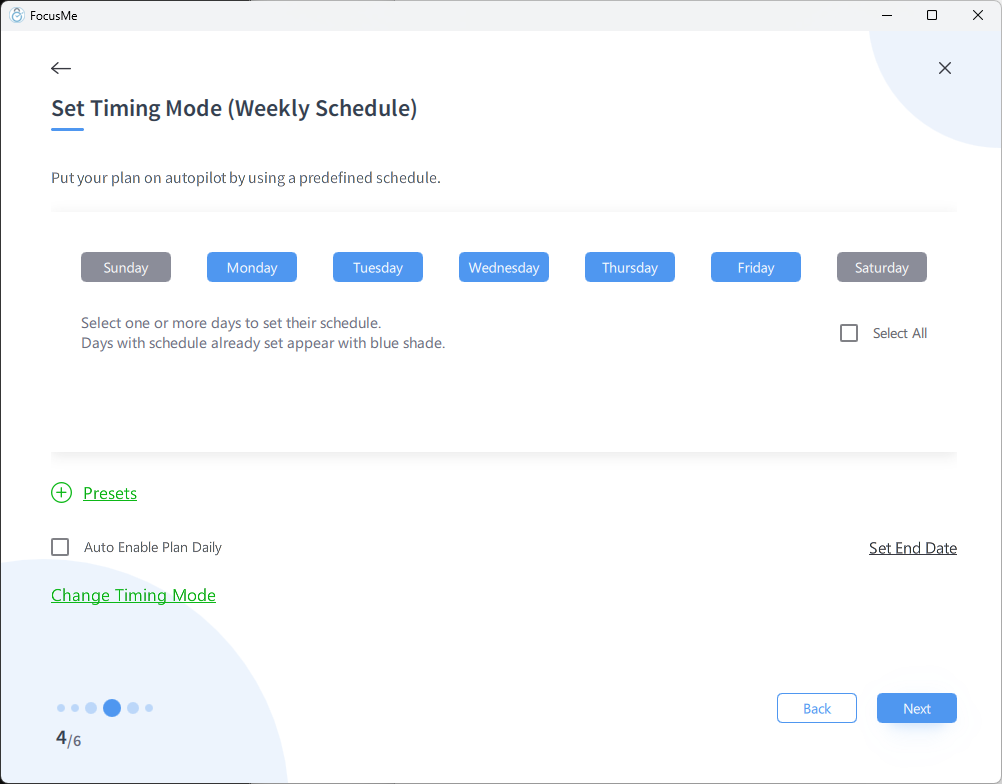
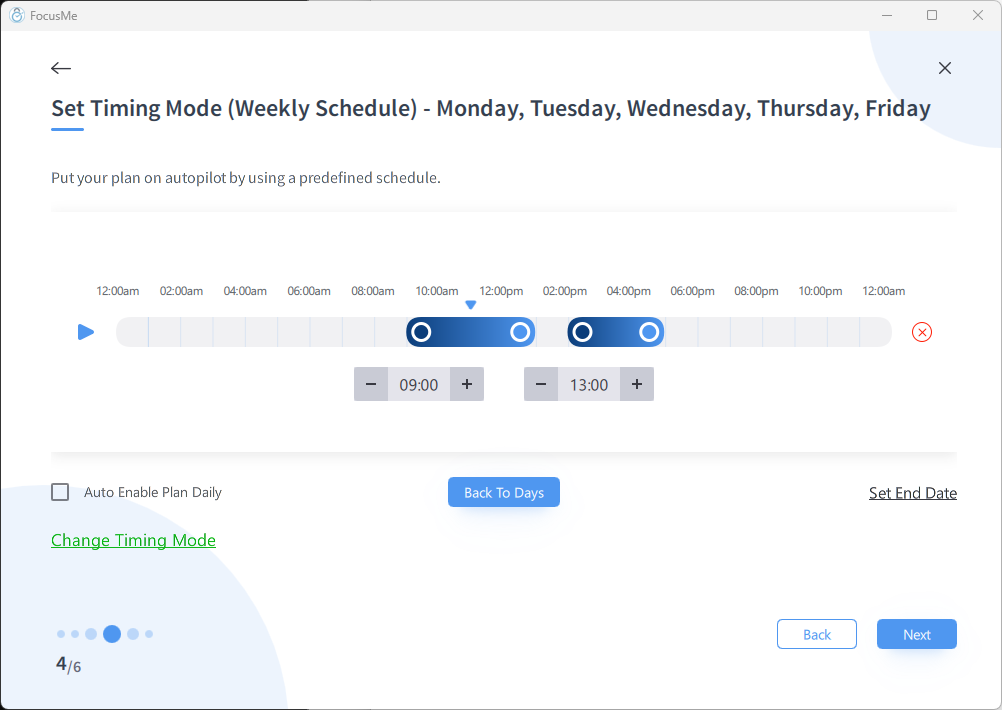 1. In the Plan Wizard, at the Schedule step, choose **Weekly Schedule**
2. You'll see a weekly timeline grid showing Monday through Sunday
3. Click and drag to create time blocks for each day
4. Each block defines when the plan is **active** (blocking)
## Examples
### Work Hours Blocking
Block social media Monday to Friday, 9 AM – 5 PM:
* Select Monday through Friday
* Set the time interval to 9:00 – 17:00
### Evening Wind-Down
Block all screens after 10 PM every night:
* Select all seven days
* Set the time interval to 22:00 – 23:59
### Weekend Study Sessions
Block distractions Saturday and Sunday mornings:
* Select Saturday and Sunday
* Set the time interval to 8:00 – 13:00
## Multiple Intervals Per Day
You can add multiple time blocks per day. For example:
* Morning focus: 9:00 – 12:00
* Afternoon focus: 13:00 – 17:00
* This leaves 12:00 – 13:00 free for lunch
## Tips
* **Start with your actual routine.** Match the schedule to when you actually need to focus, not an idealised version.
* **Leave gaps for breaks.** Don't schedule 9 AM to midnight — you need unblocked time too.
* **Combine with protection.** A weekly schedule with Enforced protection is the ultimate "set and forget" setup. It just works, every week, with no way to bypass it.
* **Adjust as needed.** If you find the schedule too aggressive, edit the plan and adjust the time blocks. (Unless you're using Enforced protection — then you'll need to wait for the schedule to end.)
1. In the Plan Wizard, at the Schedule step, choose **Weekly Schedule**
2. You'll see a weekly timeline grid showing Monday through Sunday
3. Click and drag to create time blocks for each day
4. Each block defines when the plan is **active** (blocking)
## Examples
### Work Hours Blocking
Block social media Monday to Friday, 9 AM – 5 PM:
* Select Monday through Friday
* Set the time interval to 9:00 – 17:00
### Evening Wind-Down
Block all screens after 10 PM every night:
* Select all seven days
* Set the time interval to 22:00 – 23:59
### Weekend Study Sessions
Block distractions Saturday and Sunday mornings:
* Select Saturday and Sunday
* Set the time interval to 8:00 – 13:00
## Multiple Intervals Per Day
You can add multiple time blocks per day. For example:
* Morning focus: 9:00 – 12:00
* Afternoon focus: 13:00 – 17:00
* This leaves 12:00 – 13:00 free for lunch
## Tips
* **Start with your actual routine.** Match the schedule to when you actually need to focus, not an idealised version.
* **Leave gaps for breaks.** Don't schedule 9 AM to midnight — you need unblocked time too.
* **Combine with protection.** A weekly schedule with Enforced protection is the ultimate "set and forget" setup. It just works, every week, with no way to bypass it.
* **Adjust as needed.** If you find the schedule too aggressive, edit the plan and adjust the time blocks. (Unless you're using Enforced protection — then you'll need to wait for the schedule to end.)