> ## Documentation Index
> Fetch the complete documentation index at: https://docs.focusme.com/llms.txt
> Use this file to discover all available pages before exploring further.
# Update FocusMe
> Keep FocusMe up to date — automatic updates, manual checks, and update protection settings.
FocusMe checks for updates automatically and can install them with or without your intervention, depending on your settings.
## Automatic Update Checking
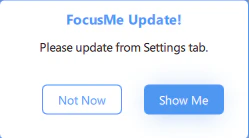
FocusMe checks for new versions every few hours in the background. When an update is available, you'll see a notification.
 ## Update Method
Configure how updates are handled in **Settings** → **General**:
| Method | Behaviour |
| ------------- | --------------------------------------------------------------------------------------------------------------- |
| **Prompt** | FocusMe notifies you when an update is available and asks for permission to install. You choose when to update. |
| **Automatic** | Updates are downloaded and installed automatically without prompting. FocusMe restarts itself after updating. |
## Manual Update Check
To check for updates immediately:
1. Open **Settings** → **General**
2. Click the **Check Now** button
3. If an update is available, follow the prompts to install it
## Update Protection
FocusMe can prevent updates from being installed while plans are active. This ensures that an update restart doesn't interrupt your blocking.
To enable update protection:
1. Open **Settings** → **System**
2. Enable **Protect Install/Updates**
When enabled:
* Updates are **blocked** while any plan is actively running
* Updates can proceed when all plans are stopped or outside their schedule
* This prevents a restart from creating a gap in your protection
If you use Enforced protection on plans that run most of the day, schedule a maintenance window (e.g., a gap in your weekly schedule) so updates can install.
## Update Method
Configure how updates are handled in **Settings** → **General**:
| Method | Behaviour |
| ------------- | --------------------------------------------------------------------------------------------------------------- |
| **Prompt** | FocusMe notifies you when an update is available and asks for permission to install. You choose when to update. |
| **Automatic** | Updates are downloaded and installed automatically without prompting. FocusMe restarts itself after updating. |
## Manual Update Check
To check for updates immediately:
1. Open **Settings** → **General**
2. Click the **Check Now** button
3. If an update is available, follow the prompts to install it
## Update Protection
FocusMe can prevent updates from being installed while plans are active. This ensures that an update restart doesn't interrupt your blocking.
To enable update protection:
1. Open **Settings** → **System**
2. Enable **Protect Install/Updates**
When enabled:
* Updates are **blocked** while any plan is actively running
* Updates can proceed when all plans are stopped or outside their schedule
* This prevents a restart from creating a gap in your protection
If you use Enforced protection on plans that run most of the day, schedule a maintenance window (e.g., a gap in your weekly schedule) so updates can install.