> ## Documentation Index
> Fetch the complete documentation index at: https://docs.focusme.com/llms.txt
> Use this file to discover all available pages before exploring further.
# Troubleshoot: Websites Not Blocked
> What to do when FocusMe isn't blocking a website as expected.
If a website isn't being blocked when it should be, work through these steps.
## 1. Check the Plan is Active
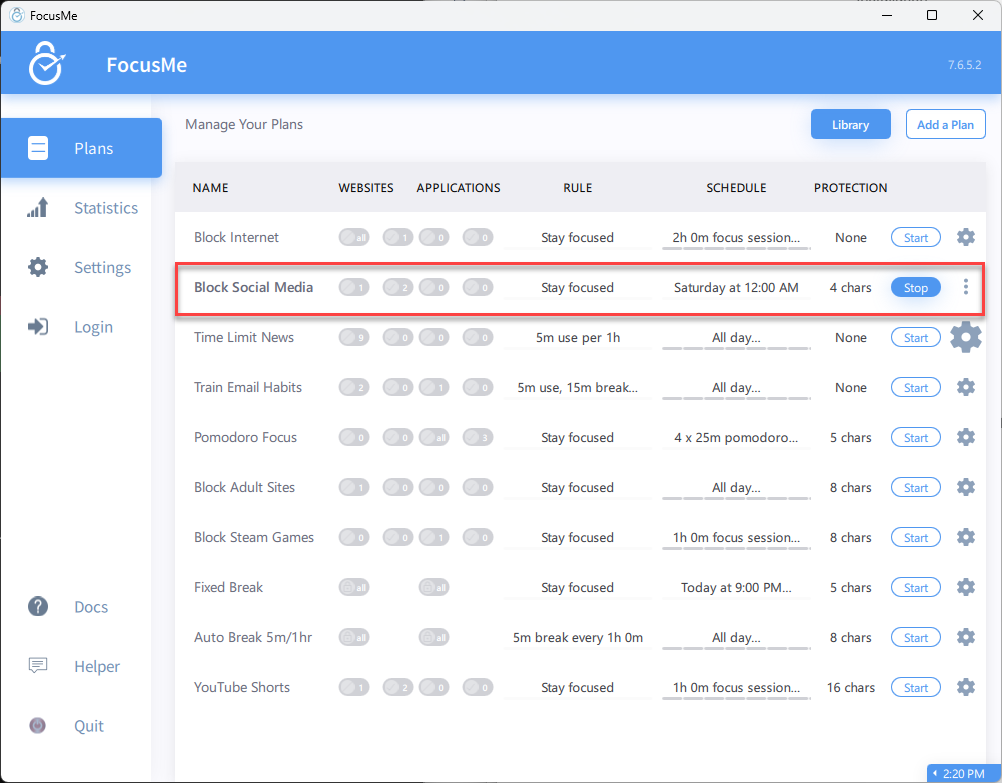 Open FocusMe and verify:
* The plan is **started** (not stopped or paused)
* The current time falls within the plan's **schedule**
* If using a Time Limit, you haven't **run out of budget** yet
## 2. Check the Website is in the Target List
Open the plan and verify the website URL is listed correctly:
* Check spelling
* Try adding both with and without `www.`
* Make sure you're matching the right domain (e.g., `x.com` not `twitter.com`)
## 3. Install the Browser Extension
The browser extension provides the most reliable website blocking. Without it, blocking may be less accurate for some sites.
[Install the browser extension →](/advanced/browser-extension)
## 4. Check Browser Compatibility
The extension works with:
* Chrome, Edge, Brave, Opera, Vivaldi (Chromium-based)
* Firefox
If you're using an unsupported browser, FocusMe falls back to window title matching. Add the site by **title** as well as URL.
## 5. Check for Redirects or Subdomains
Some sites use subdomains or redirects that don't match your entry:
* Try adding just the root domain without `www.`
* Use the [Helper Tool](/guides/using-the-helper-tool) to see exactly what URL FocusMe detects
* Consider using [RegEx](/advanced/regex) for broader pattern matching
## 6. Try Title Matching
Add a second entry matching the site by **window title** instead of URL. For example, add `YouTube` as a title match alongside `youtube.com` as a URL match.
## 7. Restart FocusMe
Sometimes a restart resolves detection issues:
1. Right-click the FocusMe tray icon → Exit
2. Relaunch FocusMe
3. On Windows, also try restarting FocusMe
## Still Not Working?
[Contact Support](https://focusme.com/contact-us/) with:
* Your operating system and version
* Which browser you're using
* The website URL that isn't being blocked
* A screenshot of your plan configuration
Open FocusMe and verify:
* The plan is **started** (not stopped or paused)
* The current time falls within the plan's **schedule**
* If using a Time Limit, you haven't **run out of budget** yet
## 2. Check the Website is in the Target List
Open the plan and verify the website URL is listed correctly:
* Check spelling
* Try adding both with and without `www.`
* Make sure you're matching the right domain (e.g., `x.com` not `twitter.com`)
## 3. Install the Browser Extension
The browser extension provides the most reliable website blocking. Without it, blocking may be less accurate for some sites.
[Install the browser extension →](/advanced/browser-extension)
## 4. Check Browser Compatibility
The extension works with:
* Chrome, Edge, Brave, Opera, Vivaldi (Chromium-based)
* Firefox
If you're using an unsupported browser, FocusMe falls back to window title matching. Add the site by **title** as well as URL.
## 5. Check for Redirects or Subdomains
Some sites use subdomains or redirects that don't match your entry:
* Try adding just the root domain without `www.`
* Use the [Helper Tool](/guides/using-the-helper-tool) to see exactly what URL FocusMe detects
* Consider using [RegEx](/advanced/regex) for broader pattern matching
## 6. Try Title Matching
Add a second entry matching the site by **window title** instead of URL. For example, add `YouTube` as a title match alongside `youtube.com` as a URL match.
## 7. Restart FocusMe
Sometimes a restart resolves detection issues:
1. Right-click the FocusMe tray icon → Exit
2. Relaunch FocusMe
3. On Windows, also try restarting FocusMe
## Still Not Working?
[Contact Support](https://focusme.com/contact-us/) with:
* Your operating system and version
* Which browser you're using
* The website URL that isn't being blocked
* A screenshot of your plan configuration