> ## Documentation Index
> Fetch the complete documentation index at: https://docs.focusme.com/llms.txt
> Use this file to discover all available pages before exploring further.
# Protect a Plan from Yourself
> Set up protection so you can't impulsively disable your focus plans.
The whole point of FocusMe is that it blocks things even when you don't want it to. Protection makes your plans tamper-resistant.
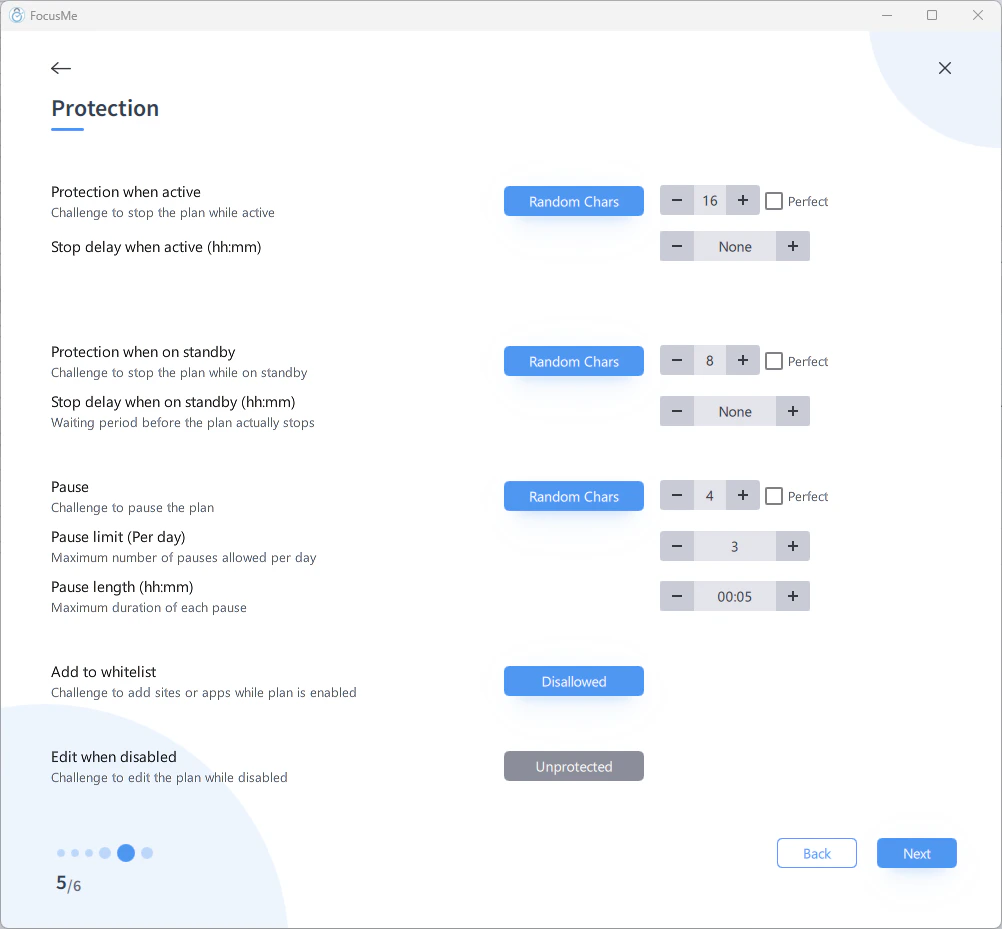 ## Choose Your Protection Level
| If you need... | Use |
| ---------------- | ---------------------------------------------- |
| A gentle nudge | **Password** — give it to a friend |
| Real friction | **Random Characters** — 50+ characters to type |
| Total commitment | **Enforced** — no bypass possible |
## The "Give Your Password Away" Strategy
1. Set protection to **Password**
2. Use a strong, random password
3. Give the password to a trusted friend, partner, or family member
4. Tell them: "Don't give me the password unless it's a genuine emergency"
You can still unlock the plan if you truly need to, but you have to ask someone — which adds social accountability.
## The "Random Characters" Strategy
## Choose Your Protection Level
| If you need... | Use |
| ---------------- | ---------------------------------------------- |
| A gentle nudge | **Password** — give it to a friend |
| Real friction | **Random Characters** — 50+ characters to type |
| Total commitment | **Enforced** — no bypass possible |
## The "Give Your Password Away" Strategy
1. Set protection to **Password**
2. Use a strong, random password
3. Give the password to a trusted friend, partner, or family member
4. Tell them: "Don't give me the password unless it's a genuine emergency"
You can still unlock the plan if you truly need to, but you have to ask someone — which adds social accountability.
## The "Random Characters" Strategy
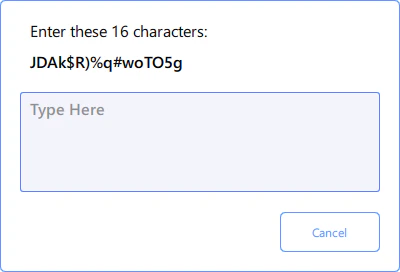 1. Set protection to **Random Characters**
2. Set the length to 50+ characters
3. When you try to disable the plan, you must type out a long random string
This doesn't make it impossible, but it takes enough effort (and enough time to reconsider) that you'll usually decide the distraction isn't worth it.
## The "Nuclear" Strategy
1. Set protection to **Enforced** on both Active and Standby contexts
2. Use a **Weekly Schedule** with your desired blocking times
3. Once the plan starts, it cannot be stopped, paused, edited, or deleted until the schedule allows it
Test your plan configuration thoroughly with no protection first. Once you enable Enforced mode, you're locked in.
## Tips
* **Start mild, escalate gradually.** Most people don't need Enforced mode right away. Password + a trusted friend works surprisingly well.
* **Use pause limits** as a middle ground. Allow 2-3 pauses per day, 10 minutes each. You can take breaks, but they're rationed.
* **Set standby and disabled protection** too. Without it, you can stop the plan, edit it to remove protection, and restart it. Set at least Password protection on standby and when disabled.
1. Set protection to **Random Characters**
2. Set the length to 50+ characters
3. When you try to disable the plan, you must type out a long random string
This doesn't make it impossible, but it takes enough effort (and enough time to reconsider) that you'll usually decide the distraction isn't worth it.
## The "Nuclear" Strategy
1. Set protection to **Enforced** on both Active and Standby contexts
2. Use a **Weekly Schedule** with your desired blocking times
3. Once the plan starts, it cannot be stopped, paused, edited, or deleted until the schedule allows it
Test your plan configuration thoroughly with no protection first. Once you enable Enforced mode, you're locked in.
## Tips
* **Start mild, escalate gradually.** Most people don't need Enforced mode right away. Password + a trusted friend works surprisingly well.
* **Use pause limits** as a middle ground. Allow 2-3 pauses per day, 10 minutes each. You can take breaks, but they're rationed.
* **Set standby and disabled protection** too. Without it, you can stop the plan, edit it to remove protection, and restart it. Set at least Password protection on standby and when disabled.