> ## Documentation Index
> Fetch the complete documentation index at: https://docs.focusme.com/llms.txt
> Use this file to discover all available pages before exploring further.
# Pause a Plan
> Temporarily pause blocking when you need a quick break.
Sometimes you need to briefly access a blocked site or app — checking a work-related YouTube video, or responding to a Facebook message. Pausing lets you do this without stopping the entire plan.
## How to Pause
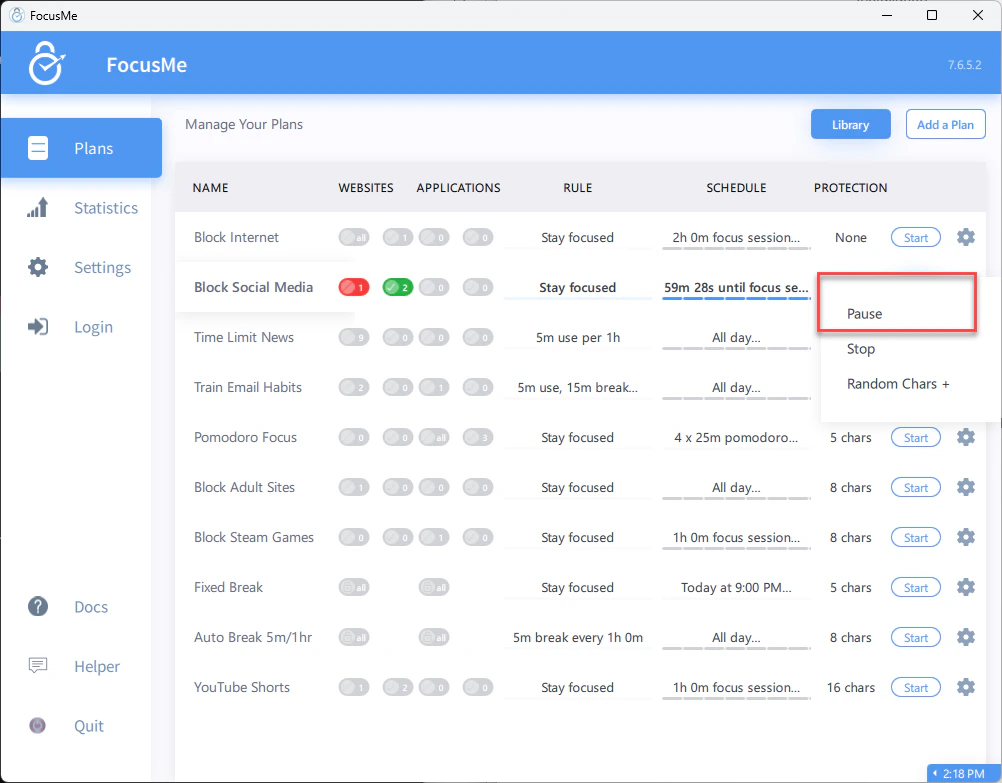 1. Open FocusMe or right-click the tray icon
2. Find the active plan
3. Click **Pause**
4. If the plan has protection, enter your password or type the random characters
5. Blocking is suspended for the configured pause duration
## Pause Limits
If configured, pauses are limited by:
* **Pause count** — maximum number of pauses per day (e.g., 3)
* **Pause length** — maximum duration of each pause (e.g., 10 minutes)
Once you've used all your pauses, the plan cannot be paused again until the next day.
## Pause vs Stop
| Action | Effect |
| --------- | --------------------------------------------------------------------------------------------------- |
| **Pause** | Temporarily suspends blocking. Resumes automatically after the pause duration. |
| **Stop** | Fully deactivates the plan. Must be manually restarted (or wait for the next scheduled activation). |
Pausing is the safer option — you know blocking will resume automatically. Stopping risks forgetting to restart.
On Screen Break and Pomodoro plans, the button says **Postpone** instead of Pause — it delays the start of a break. It's the same mechanism with the same limits and protection settings.
If you find yourself pausing constantly, your plan might be too aggressive. Consider switching to a **Time Limit** plan type that gives you a daily budget instead of total blocking.
1. Open FocusMe or right-click the tray icon
2. Find the active plan
3. Click **Pause**
4. If the plan has protection, enter your password or type the random characters
5. Blocking is suspended for the configured pause duration
## Pause Limits
If configured, pauses are limited by:
* **Pause count** — maximum number of pauses per day (e.g., 3)
* **Pause length** — maximum duration of each pause (e.g., 10 minutes)
Once you've used all your pauses, the plan cannot be paused again until the next day.
## Pause vs Stop
| Action | Effect |
| --------- | --------------------------------------------------------------------------------------------------- |
| **Pause** | Temporarily suspends blocking. Resumes automatically after the pause duration. |
| **Stop** | Fully deactivates the plan. Must be manually restarted (or wait for the next scheduled activation). |
Pausing is the safer option — you know blocking will resume automatically. Stopping risks forgetting to restart.
On Screen Break and Pomodoro plans, the button says **Postpone** instead of Pause — it delays the start of a break. It's the same mechanism with the same limits and protection settings.
If you find yourself pausing constantly, your plan might be too aggressive. Consider switching to a **Time Limit** plan type that gives you a daily budget instead of total blocking.