> ## Documentation Index
> Fetch the complete documentation index at: https://docs.focusme.com/llms.txt
> Use this file to discover all available pages before exploring further.
# Partially Block Websites
> Block specific parts of a website while allowing the rest.
You don't have to block an entire site. FocusMe lets you block specific pages, sections, or features while keeping the rest accessible.
## How It Works
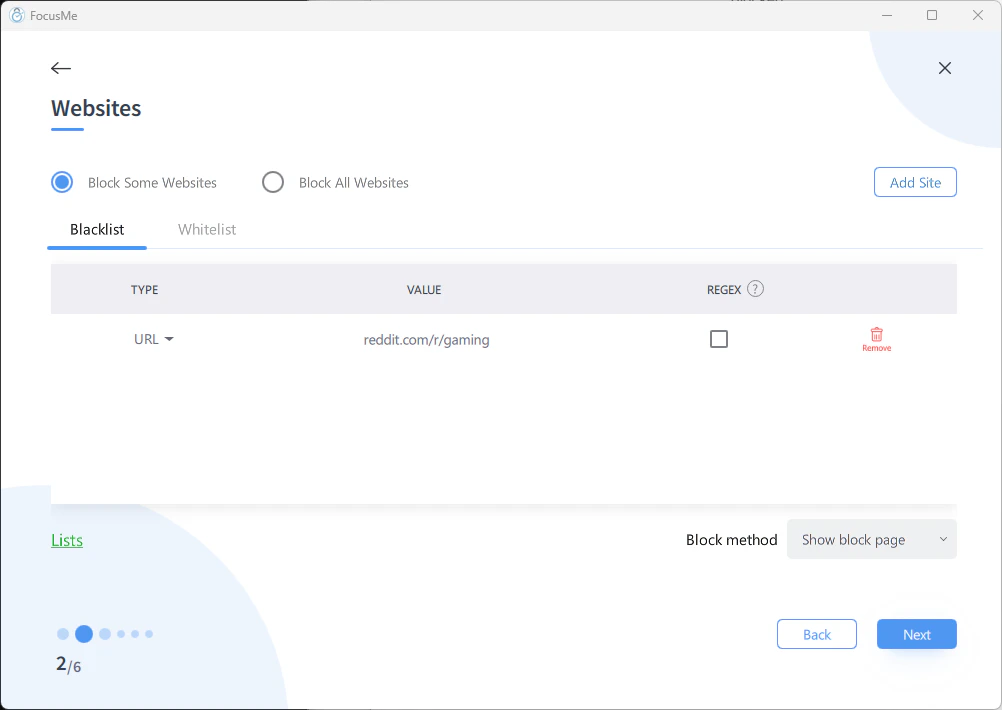 Instead of entering just a domain (e.g., `youtube.com`), enter a more specific URL path to block only that section.
## Examples
| Block This | But Allow This | Entry |
| ------------------ | ------------------ | -------------------------------------------------- |
| YouTube Shorts | Regular YouTube | `youtube.com/shorts` |
| Reddit gaming | Other subreddits | `reddit.com/r/gaming` |
| Facebook feed | Facebook Messenger | `facebook.com` (whitelist `facebook.com/messages`) |
| Instagram Reels | Instagram profiles | `instagram.com/reels` |
| Twitter/X trending | Your timeline | `x.com/explore` |
## Method 1: Specific URL Paths
Add the specific URL path as a blocked entry:
```
youtube.com/shorts
reddit.com/r/gaming
reddit.com/r/funny
```
FocusMe matches these as substrings, so `youtube.com/shorts` catches both the Shorts feed and individual Shorts videos.
## Method 2: Whitelist Within a Block
For the reverse approach — block the whole site but allow a specific section:
1. Choose **Block Some Websites**
2. Add the full domain: `facebook.com`
3. In protection settings, add a **whitelist** entry: `facebook.com/messages`
## Method 3: Title Matching
Match by window title to catch specific content regardless of URL:
* Title containing `Shorts` — blocks YouTube Shorts
* Title containing `Reels` — blocks Instagram Reels
* Title containing the name of a specific game or show
## Method 4: RegEx
For advanced pattern matching:
```
youtube\.com/(shorts|feed|trending)
```
This blocks Shorts, the feed, and trending pages but allows regular video pages, channels, and search.
[Learn more about RegEx →](/advanced/regex)
Instead of entering just a domain (e.g., `youtube.com`), enter a more specific URL path to block only that section.
## Examples
| Block This | But Allow This | Entry |
| ------------------ | ------------------ | -------------------------------------------------- |
| YouTube Shorts | Regular YouTube | `youtube.com/shorts` |
| Reddit gaming | Other subreddits | `reddit.com/r/gaming` |
| Facebook feed | Facebook Messenger | `facebook.com` (whitelist `facebook.com/messages`) |
| Instagram Reels | Instagram profiles | `instagram.com/reels` |
| Twitter/X trending | Your timeline | `x.com/explore` |
## Method 1: Specific URL Paths
Add the specific URL path as a blocked entry:
```
youtube.com/shorts
reddit.com/r/gaming
reddit.com/r/funny
```
FocusMe matches these as substrings, so `youtube.com/shorts` catches both the Shorts feed and individual Shorts videos.
## Method 2: Whitelist Within a Block
For the reverse approach — block the whole site but allow a specific section:
1. Choose **Block Some Websites**
2. Add the full domain: `facebook.com`
3. In protection settings, add a **whitelist** entry: `facebook.com/messages`
## Method 3: Title Matching
Match by window title to catch specific content regardless of URL:
* Title containing `Shorts` — blocks YouTube Shorts
* Title containing `Reels` — blocks Instagram Reels
* Title containing the name of a specific game or show
## Method 4: RegEx
For advanced pattern matching:
```
youtube\.com/(shorts|feed|trending)
```
This blocks Shorts, the feed, and trending pages but allows regular video pages, channels, and search.
[Learn more about RegEx →](/advanced/regex)