> ## Documentation Index
> Fetch the complete documentation index at: https://docs.focusme.com/llms.txt
> Use this file to discover all available pages before exploring further.
# Manage Your Account
> Account setup, license activation, and subscription management.
## Creating an Account
You can create a FocusMe account:
* **In the app** — click the login/signup option in FocusMe
* **On the website** — visit [focusme.com](https://focusme.com)
An account lets you sync plans across devices and manage your license.
## License Activation
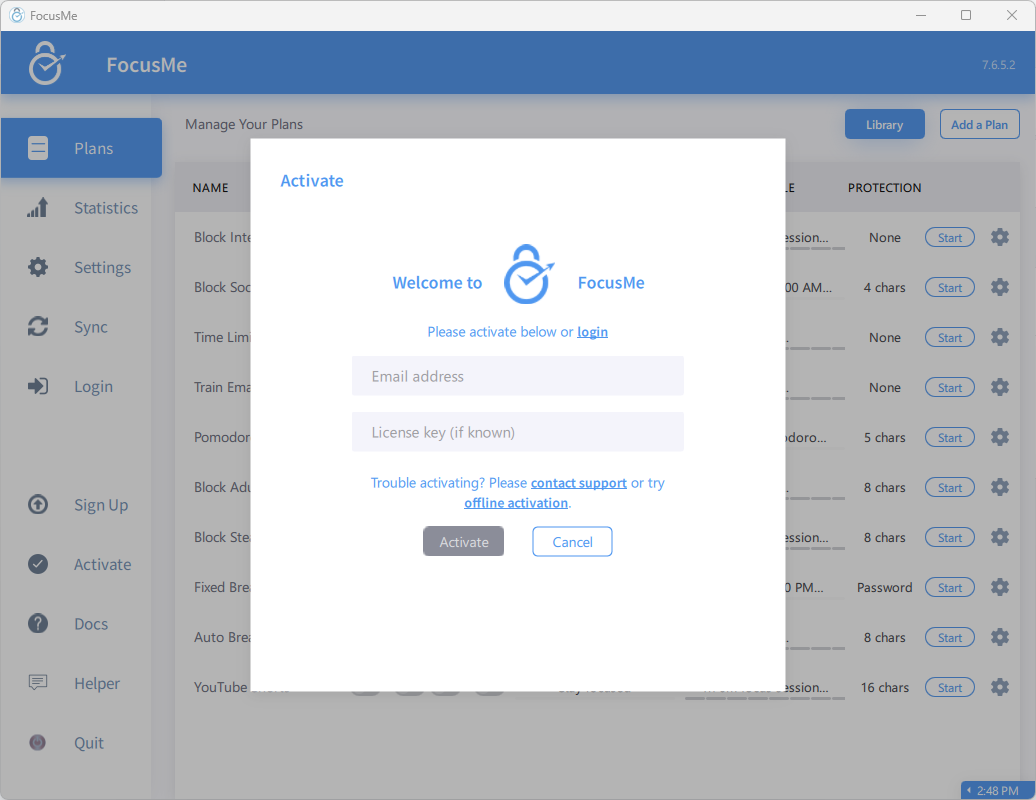 ### With a License Key
1. Open FocusMe
2. Go to Settings or the activation screen
3. Enter your license key
4. The key is validated and your app is activated
### With Your Account
If your license is linked to your email:
1. Log into FocusMe with your account credentials
2. Your license is detected automatically
3. No key entry needed
## Device Limits
Each license allows a set number of concurrent devices (default: 5). If you reach the limit:
* Deactivate an old device before adding a new one
* Or contact support to adjust your limit
## Free Trial
FocusMe offers a free trial with full access to all features:
* Trial duration is tracked per device and per account
* Installing on a new device or creating a new account does not reset the trial
* After the trial, you'll need a license to continue using FocusMe
## Subscription Management
If you have a subscription license:
* Manage billing through your Paddle account (payment processor)
* Cancel, upgrade, or update payment details there
* Your FocusMe access continues until the current billing period ends
### With a License Key
1. Open FocusMe
2. Go to Settings or the activation screen
3. Enter your license key
4. The key is validated and your app is activated
### With Your Account
If your license is linked to your email:
1. Log into FocusMe with your account credentials
2. Your license is detected automatically
3. No key entry needed
## Device Limits
Each license allows a set number of concurrent devices (default: 5). If you reach the limit:
* Deactivate an old device before adding a new one
* Or contact support to adjust your limit
## Free Trial
FocusMe offers a free trial with full access to all features:
* Trial duration is tracked per device and per account
* Installing on a new device or creating a new account does not reset the trial
* After the trial, you'll need a license to continue using FocusMe
## Subscription Management
If you have a subscription license:
* Manage billing through your Paddle account (payment processor)
* Cancel, upgrade, or update payment details there
* Your FocusMe access continues until the current billing period ends