> ## Documentation Index
> Fetch the complete documentation index at: https://docs.focusme.com/llms.txt
> Use this file to discover all available pages before exploring further.
# Block YouTube Shorts
> Block YouTube Shorts and similar short-form video while keeping regular YouTube accessible.
Short-form video (YouTube Shorts, Instagram Reels, TikTok) is engineered for infinite scrolling. Here's how to block it selectively.
## Block YouTube Shorts Only
You can block Shorts while keeping regular YouTube videos, search, and channels accessible.
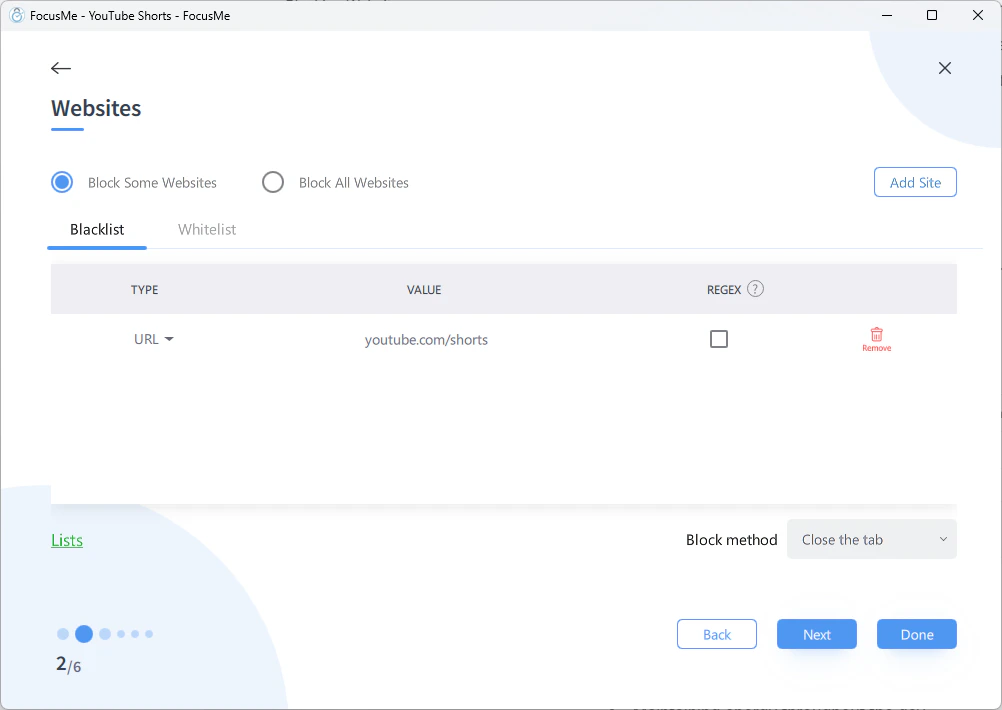 1. **Add a Plan** → choose **Block** → **Block Some Websites**
2. Add this URL: `youtube.com/shorts`
3. This blocks the Shorts feed and individual Shorts, but allows everything else on YouTube
FocusMe matches URLs by substring, so `youtube.com/shorts` catches both `youtube.com/shorts` (the feed) and `youtube.com/shorts/abc123` (individual videos).
## Block the Shorts Shelf on the Homepage
YouTube also shows Shorts on the main homepage and in search results. To catch these, add a **title-based** entry:
1. Add a website entry with **Title** matching: `Shorts`
2. This blocks any browser tab that has "Shorts" in the title
Title matching is broad — make sure "Shorts" doesn't appear in other window titles you need. If it does, use the more specific URL approach.
## Block All Short-Form Video
To block Shorts, Reels, and TikTok in one plan:
| Platform | URL to Block |
| -------------------- | --------------------- |
| YouTube Shorts | `youtube.com/shorts` |
| Instagram Reels | `instagram.com/reels` |
| TikTok (entire site) | `tiktok.com` |
| Facebook Reels | `facebook.com/reel` |
Add all of these to a single plan for comprehensive short-form video blocking.
## Using RegEx for Broader Matching
For advanced users, a single RegEx entry can catch multiple short-form video patterns:
```
(youtube\.com/shorts|instagram\.com/reels|facebook\.com/reel|tiktok\.com)
```
Check the **RegEx** box on the entry for this to work.
[Learn more about RegEx →](/advanced/regex)
1. **Add a Plan** → choose **Block** → **Block Some Websites**
2. Add this URL: `youtube.com/shorts`
3. This blocks the Shorts feed and individual Shorts, but allows everything else on YouTube
FocusMe matches URLs by substring, so `youtube.com/shorts` catches both `youtube.com/shorts` (the feed) and `youtube.com/shorts/abc123` (individual videos).
## Block the Shorts Shelf on the Homepage
YouTube also shows Shorts on the main homepage and in search results. To catch these, add a **title-based** entry:
1. Add a website entry with **Title** matching: `Shorts`
2. This blocks any browser tab that has "Shorts" in the title
Title matching is broad — make sure "Shorts" doesn't appear in other window titles you need. If it does, use the more specific URL approach.
## Block All Short-Form Video
To block Shorts, Reels, and TikTok in one plan:
| Platform | URL to Block |
| -------------------- | --------------------- |
| YouTube Shorts | `youtube.com/shorts` |
| Instagram Reels | `instagram.com/reels` |
| TikTok (entire site) | `tiktok.com` |
| Facebook Reels | `facebook.com/reel` |
Add all of these to a single plan for comprehensive short-form video blocking.
## Using RegEx for Broader Matching
For advanced users, a single RegEx entry can catch multiple short-form video patterns:
```
(youtube\.com/shorts|instagram\.com/reels|facebook\.com/reel|tiktok\.com)
```
Check the **RegEx** box on the entry for this to work.
[Learn more about RegEx →](/advanced/regex)