> ## Documentation Index
> Fetch the complete documentation index at: https://docs.focusme.com/llms.txt
> Use this file to discover all available pages before exploring further.
# Block Your PC at Night
> Enforce a digital curfew and go to bed on time.
Late-night screen time ruins your sleep. FocusMe can lock your computer at a set time every night.
## Setup
 1. **Add a Plan** → choose **Block** as the plan type
2. Toggle **Block Computer** on
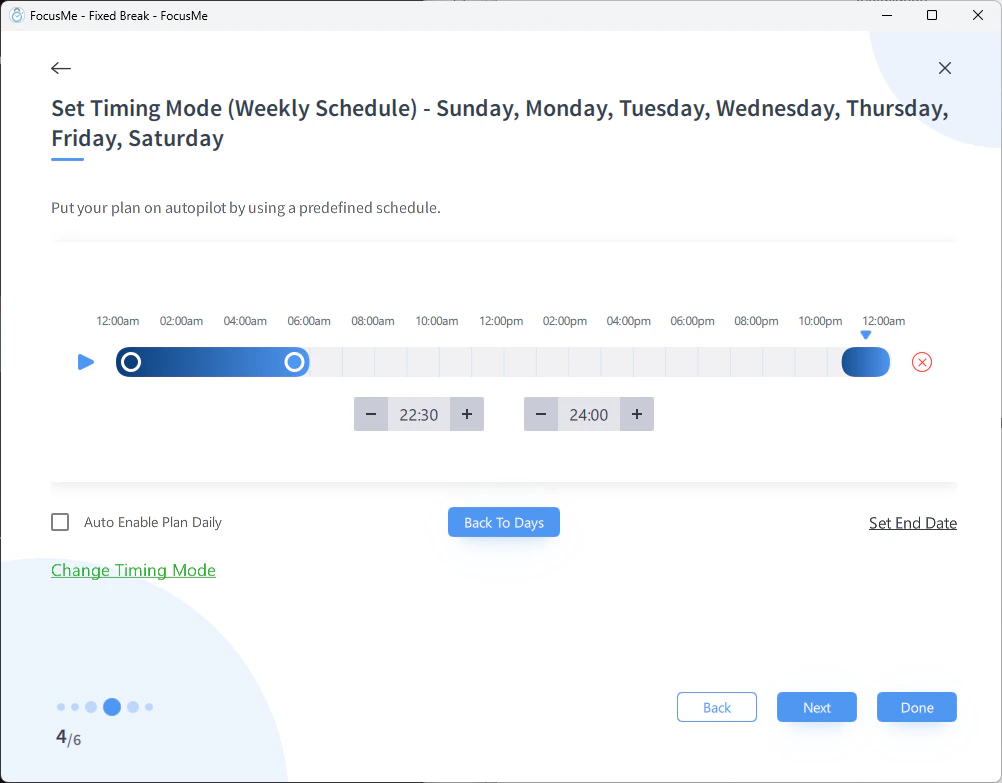
3. At the Schedule step, choose **Weekly Schedule**
4. Set the blocking time — e.g., every day 22:30 – 06:00
## Configuration Tips
* **Start with a warning.** Set a 10 PM block with a notification at 9:45 PM so you have time to save work.
* **Use Enforced protection** for maximum commitment. You won't be able to override it when you're tempted to "just check one thing."
* **Weekend flexibility.** Set different times for weekdays and weekends — e.g., 10:30 PM on weeknights, midnight on weekends.
* **Leave your phone in another room.** FocusMe blocks your computer, but your phone is still a temptation.
If you use Enforced protection with Block Computer enabled, your PC will be completely locked during the scheduled time. Make sure you save all work before the curfew starts.
1. **Add a Plan** → choose **Block** as the plan type
2. Toggle **Block Computer** on
3. At the Schedule step, choose **Weekly Schedule**
4. Set the blocking time — e.g., every day 22:30 – 06:00
## Configuration Tips
* **Start with a warning.** Set a 10 PM block with a notification at 9:45 PM so you have time to save work.
* **Use Enforced protection** for maximum commitment. You won't be able to override it when you're tempted to "just check one thing."
* **Weekend flexibility.** Set different times for weekdays and weekends — e.g., 10:30 PM on weeknights, midnight on weekends.
* **Leave your phone in another room.** FocusMe blocks your computer, but your phone is still a temptation.
If you use Enforced protection with Block Computer enabled, your PC will be completely locked during the scheduled time. Make sure you save all work before the curfew starts.