> ## Documentation Index
> Fetch the complete documentation index at: https://docs.focusme.com/llms.txt
> Use this file to discover all available pages before exploring further.
# Block Any Application or Game
> Step-by-step guide to blocking desktop applications and games.
FocusMe can block any application on your computer — games, messaging apps, browsers, or anything else.
## Quick Setup
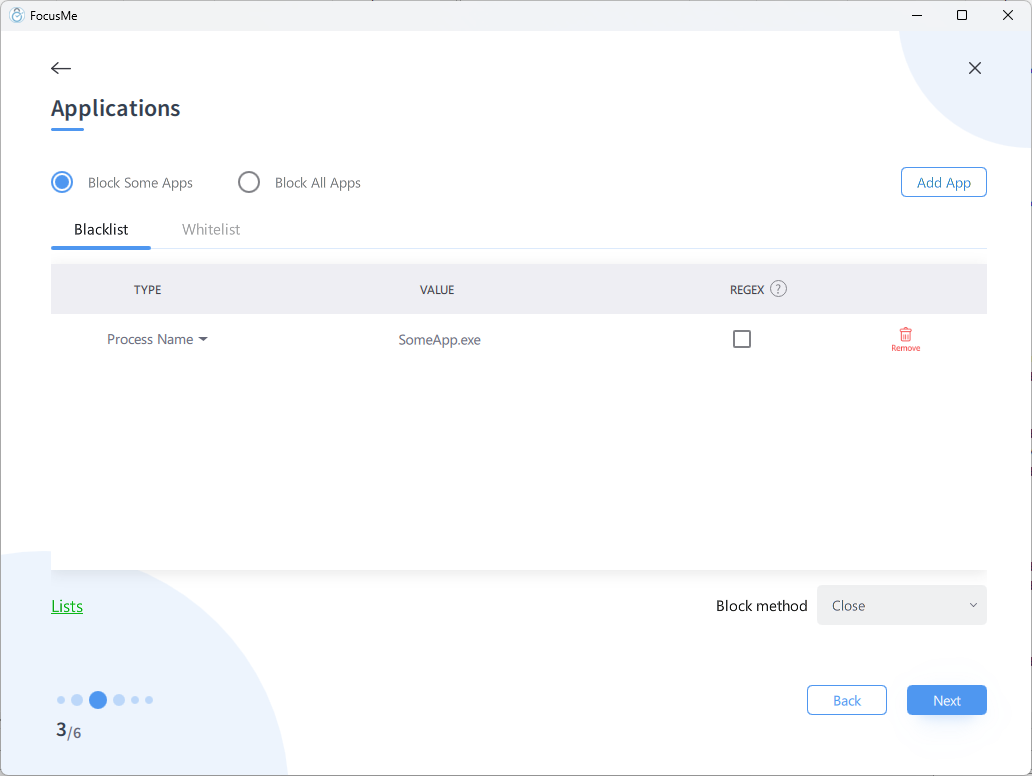 1. **Add a Plan** → choose your plan type
2. In the Applications step, choose **Block Some Apps**
3. Click **Add App**
4. Pick the app using one of four methods:
| Tab | Best For |
| ------------- | --------------------------------------------- |
| **Process** | Apps currently running — select from the list |
| **Installed** | Browse all installed applications |
| **Windows** | Select from currently open windows |
| **Custom** | Enter a process name or window title manually |
5. Set your schedule and protection
6. Click **Done**
## Blocking Games
### Steam Games
Block the game itself, not Steam:
* Steam's process is `steam.exe` — blocking this prevents access to the store, library, and all games
* Individual games have their own process names — use the Helper Tool to find them while the game is running
To block **all** Steam games without blocking the Steam client, see [Block All Steam Games](/guides/block-steam-games).
### Epic Games / Other Launchers
Same principle — block the game executable, not the launcher. Use the Helper Tool while the game is running to find the correct process name.
### Common Game Process Names
| Game | Process |
| ----------------- | ------------------------------------------------ |
| Minecraft | `javaw.exe` (match by title "Minecraft" instead) |
| Fortnite | `FortniteClient-Win64-Shipping.exe` |
| League of Legends | `League of Legends.exe` |
| Valorant | `VALORANT-Win64-Shipping.exe` |
| Roblox | `RobloxPlayerBeta.exe` |
Game process names can change with updates. If blocking stops working after a game update, use the Helper Tool to re-identify the process name.
## Blocking by Window Title
Some applications are easier to block by window title than process name:
* Windows Store (UWP) apps that share `ApplicationFrameHost.exe`
* Games running through shared launchers
* Specific content within an app (e.g., block windows titled "Netflix")
In the **Custom** tab, enter the window title text and select **Title** matching.
1. **Add a Plan** → choose your plan type
2. In the Applications step, choose **Block Some Apps**
3. Click **Add App**
4. Pick the app using one of four methods:
| Tab | Best For |
| ------------- | --------------------------------------------- |
| **Process** | Apps currently running — select from the list |
| **Installed** | Browse all installed applications |
| **Windows** | Select from currently open windows |
| **Custom** | Enter a process name or window title manually |
5. Set your schedule and protection
6. Click **Done**
## Blocking Games
### Steam Games
Block the game itself, not Steam:
* Steam's process is `steam.exe` — blocking this prevents access to the store, library, and all games
* Individual games have their own process names — use the Helper Tool to find them while the game is running
To block **all** Steam games without blocking the Steam client, see [Block All Steam Games](/guides/block-steam-games).
### Epic Games / Other Launchers
Same principle — block the game executable, not the launcher. Use the Helper Tool while the game is running to find the correct process name.
### Common Game Process Names
| Game | Process |
| ----------------- | ------------------------------------------------ |
| Minecraft | `javaw.exe` (match by title "Minecraft" instead) |
| Fortnite | `FortniteClient-Win64-Shipping.exe` |
| League of Legends | `League of Legends.exe` |
| Valorant | `VALORANT-Win64-Shipping.exe` |
| Roblox | `RobloxPlayerBeta.exe` |
Game process names can change with updates. If blocking stops working after a game update, use the Helper Tool to re-identify the process name.
## Blocking by Window Title
Some applications are easier to block by window title than process name:
* Windows Store (UWP) apps that share `ApplicationFrameHost.exe`
* Games running through shared launchers
* Specific content within an app (e.g., block windows titled "Netflix")
In the **Custom** tab, enter the window title text and select **Title** matching.