> ## Documentation Index
> Fetch the complete documentation index at: https://docs.focusme.com/llms.txt
> Use this file to discover all available pages before exploring further.
# Self-Imposed Penalty
> Add a financial consequence when you override your focus plans with an emergency stop code.
The self-imposed penalty is a voluntary system that adds a real financial consequence when you override your focus plans. It is designed to make you think twice before requesting an [emergency stop code](/concepts/plan-protection#emergency-stop-codes).
 ## How It Works
1. You choose a penalty amount in tokens that feels meaningful to you (price varies by currency)
2. When you request an emergency stop code from FocusMe support, you are charged your chosen penalty amount
3. A support agent will verify your payment and issue the code
The penalty creates a real deterrent against impulsive overrides. Knowing that bypassing your plan will cost you makes it much easier to stick with your commitment.
## Setting Up a Penalty
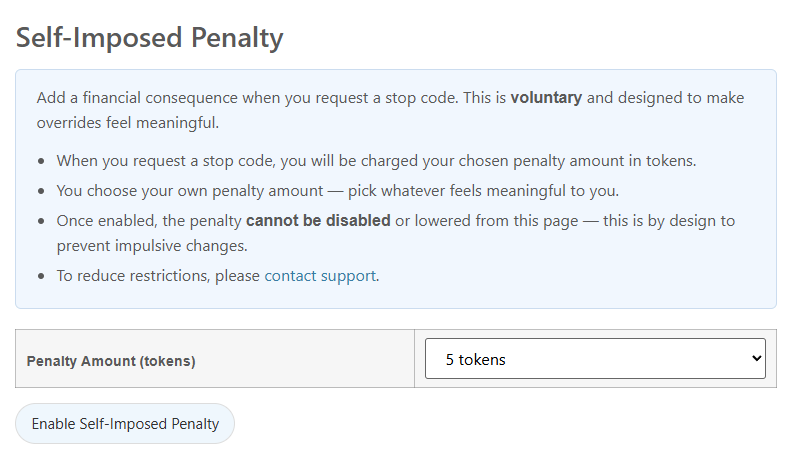
1. Log in to your [FocusMe account](https://focusme.com/my-account/?tab=accountability)
2. Navigate to the **Self-Imposed Penalty** tab
3. Click **Enable Self-Imposed Penalty**
4. Choose your penalty amount - pick whatever feels meaningful enough to make you reconsider
## How It Works
1. You choose a penalty amount in tokens that feels meaningful to you (price varies by currency)
2. When you request an emergency stop code from FocusMe support, you are charged your chosen penalty amount
3. A support agent will verify your payment and issue the code
The penalty creates a real deterrent against impulsive overrides. Knowing that bypassing your plan will cost you makes it much easier to stick with your commitment.
## Setting Up a Penalty
1. Log in to your [FocusMe account](https://focusme.com/my-account/?tab=accountability)
2. Navigate to the **Self-Imposed Penalty** tab
3. Click **Enable Self-Imposed Penalty**
4. Choose your penalty amount - pick whatever feels meaningful enough to make you reconsider
 ## Important Rules
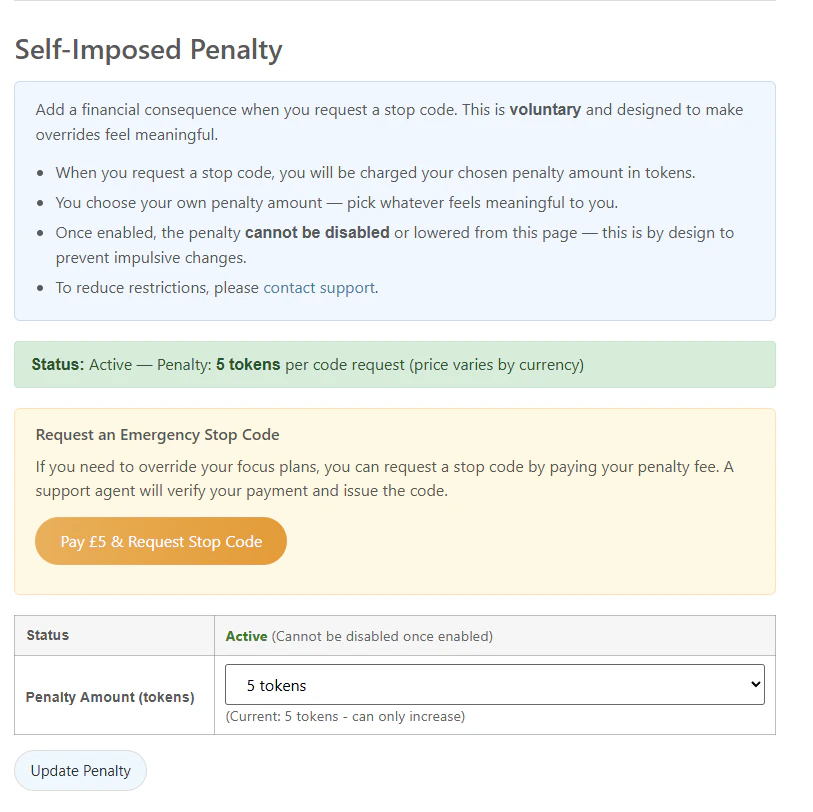
* **Cannot be disabled or lowered from the account page.** This is by design - it prevents you from impulsively removing the consequence when temptation strikes.
* **You can increase your penalty amount** at any time.
* **Contact support** if you need to make changes to your penalty settings.
The self-imposed penalty is entirely voluntary. It is an opt-in system for people who want an extra layer of commitment beyond what plan protection alone provides.
## When Are You Charged?
You are only charged when you request an emergency stop code. Normal plan usage, including stopping unprotected plans or entering a correct password, does not incur any charge. The penalty applies specifically to emergency overrides of Enforced or heavily protected plans.
## Tips
* **Start with a moderate amount.** You can always increase it later. The goal is to make the penalty meaningful enough to deter impulse, not to be punitive.
* **Combine with Enforced protection.** The penalty is most effective when paired with [Enforced mode](/concepts/plan-protection#enforced) — the stop code becomes the only way out, and now it costs you.
* **Think of it as a commitment device.** Research shows that people are more likely to follow through on goals when there is a tangible cost to breaking them.
## Important Rules
* **Cannot be disabled or lowered from the account page.** This is by design - it prevents you from impulsively removing the consequence when temptation strikes.
* **You can increase your penalty amount** at any time.
* **Contact support** if you need to make changes to your penalty settings.
The self-imposed penalty is entirely voluntary. It is an opt-in system for people who want an extra layer of commitment beyond what plan protection alone provides.
## When Are You Charged?
You are only charged when you request an emergency stop code. Normal plan usage, including stopping unprotected plans or entering a correct password, does not incur any charge. The penalty applies specifically to emergency overrides of Enforced or heavily protected plans.
## Tips
* **Start with a moderate amount.** You can always increase it later. The goal is to make the penalty meaningful enough to deter impulse, not to be punitive.
* **Combine with Enforced protection.** The penalty is most effective when paired with [Enforced mode](/concepts/plan-protection#enforced) — the stop code becomes the only way out, and now it costs you.
* **Think of it as a commitment device.** Research shows that people are more likely to follow through on goals when there is a tangible cost to breaking them.