> ## Documentation Index
> Fetch the complete documentation index at: https://docs.focusme.com/llms.txt
> Use this file to discover all available pages before exploring further.
# Schedule Modes
> Control when your plans run — on-demand sessions, weekly timetables, Pomodoro cycles, or multi-day programmes.
The Timing Mode determines **when** your plan is active. You choose a timing mode in Step 4 of the Plan Wizard.
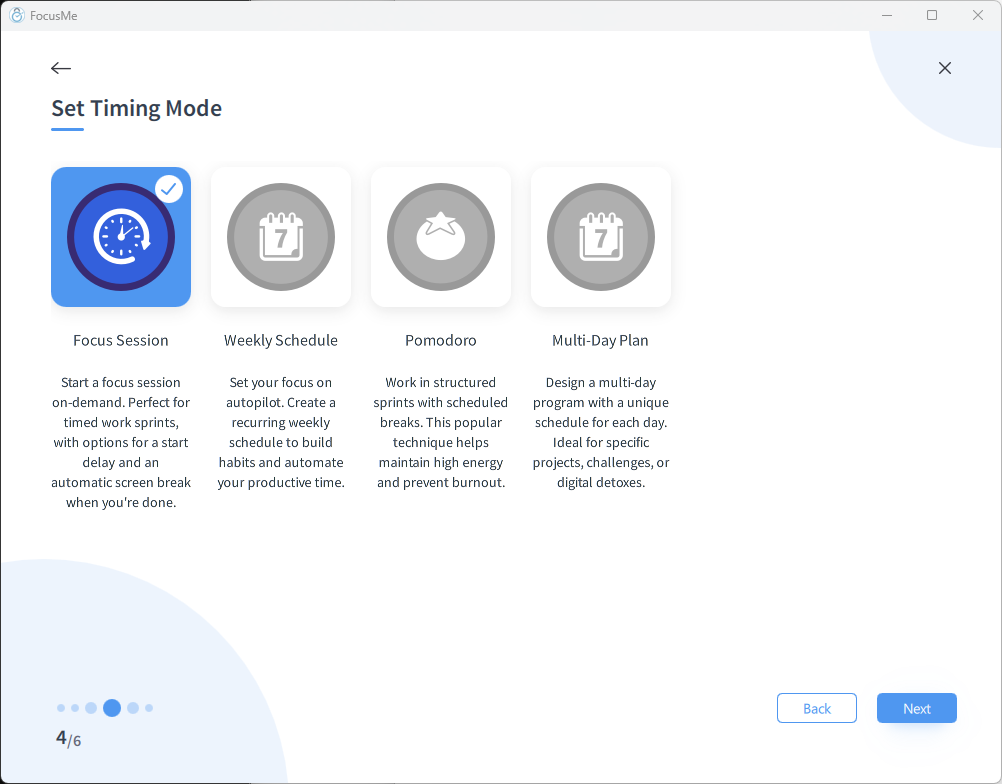 ## Focus Session (Quick Mode)
Start your plan manually whenever you need to focus. It runs for a set duration, then stops automatically.
**Configuration:**
* **Session duration** — how long the focus session lasts (days, hours, and minutes)
* **Start delay** — optional countdown before blocking begins (e.g., 5 minutes to finish what you're doing)
* **Break after session** — optional screen break when the session ends
* **Reshow on stop** — automatically reopen the session dialog when the session ends, making it easy to start another
**Best for:**
* Ad-hoc focus sessions
* "I need to focus for the next 2 hours"
* Flexible schedules that change day to day
**How to use:**
1. Create the plan with Focus Session mode
2. Click **Start** whenever you want to focus — the Quick Schedule window appears with duration controls and quick-add buttons (+15m, +30m, +1h, +2h)
3. Blocking activates (after delay, if set)
4. Session ends → blocking stops automatically
5. If you need more time, right-click the plan → **Extend Time** to add duration while the session is running
[See the full Focus Sessions guide →](/guides/focus-sessions)
## Weekly Schedule
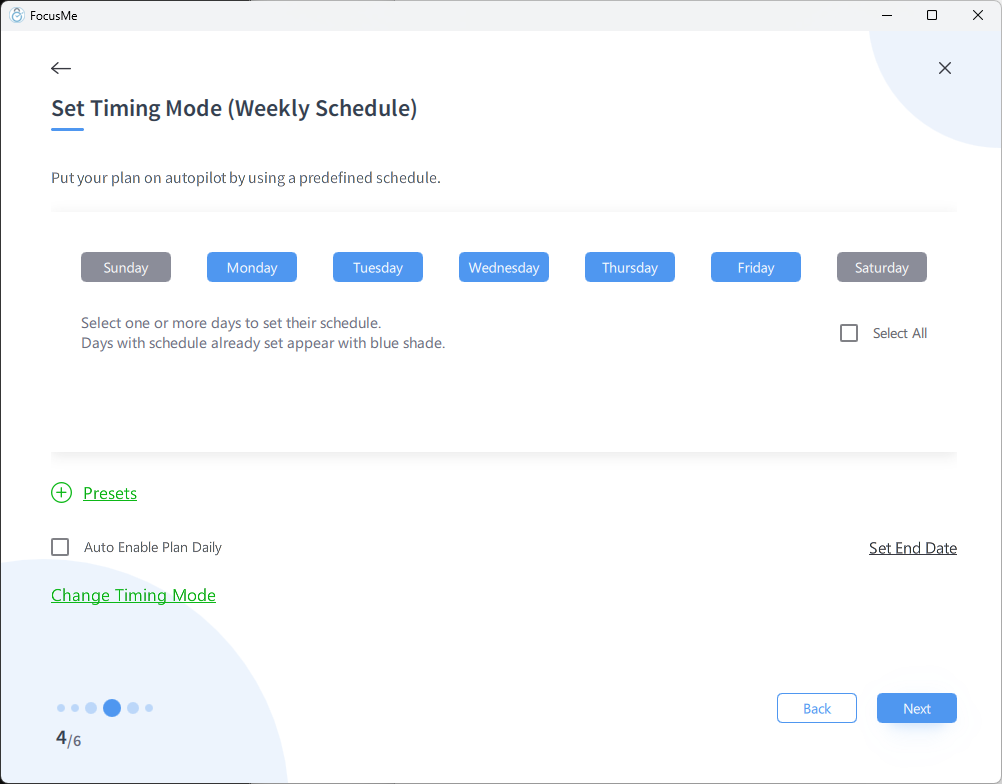
Set a recurring timetable that activates your plan at the same times every week — no manual action needed.
**Configuration:**
* Select days of the week (Mon, Tue, Wed, etc.)
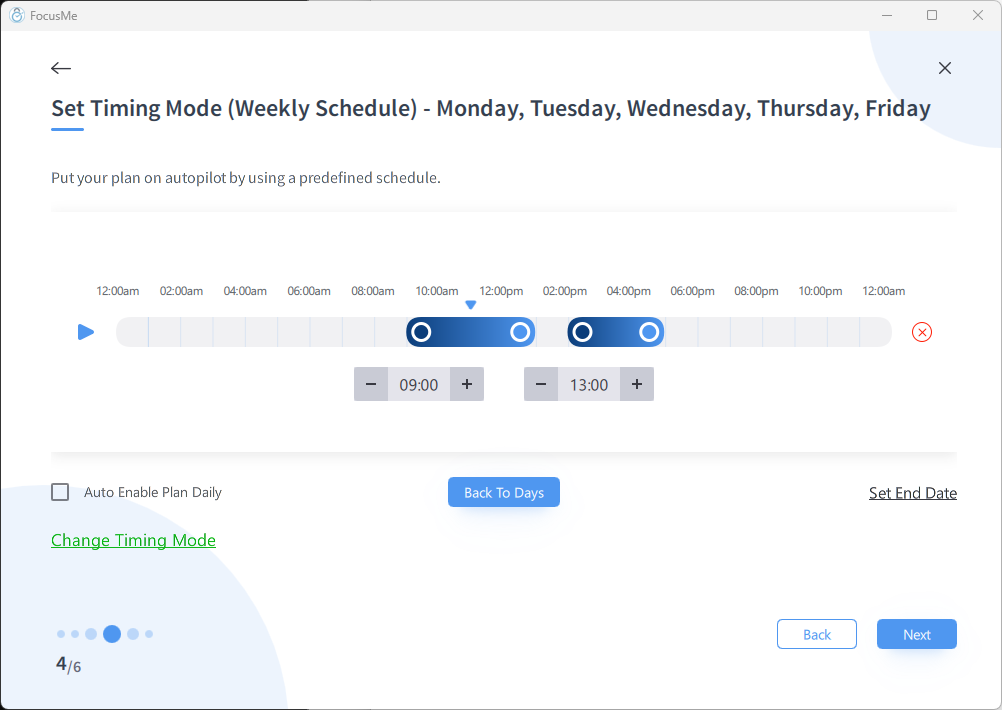
* Set time intervals for each day (e.g., 9:00 AM – 12:00 PM and 1:00 PM – 5:00 PM)
* Multiple intervals per day are supported
## Focus Session (Quick Mode)
Start your plan manually whenever you need to focus. It runs for a set duration, then stops automatically.
**Configuration:**
* **Session duration** — how long the focus session lasts (days, hours, and minutes)
* **Start delay** — optional countdown before blocking begins (e.g., 5 minutes to finish what you're doing)
* **Break after session** — optional screen break when the session ends
* **Reshow on stop** — automatically reopen the session dialog when the session ends, making it easy to start another
**Best for:**
* Ad-hoc focus sessions
* "I need to focus for the next 2 hours"
* Flexible schedules that change day to day
**How to use:**
1. Create the plan with Focus Session mode
2. Click **Start** whenever you want to focus — the Quick Schedule window appears with duration controls and quick-add buttons (+15m, +30m, +1h, +2h)
3. Blocking activates (after delay, if set)
4. Session ends → blocking stops automatically
5. If you need more time, right-click the plan → **Extend Time** to add duration while the session is running
[See the full Focus Sessions guide →](/guides/focus-sessions)
## Weekly Schedule
Set a recurring timetable that activates your plan at the same times every week — no manual action needed.
**Configuration:**
* Select days of the week (Mon, Tue, Wed, etc.)
* Set time intervals for each day (e.g., 9:00 AM – 12:00 PM and 1:00 PM – 5:00 PM)
* Multiple intervals per day are supported
 **Examples:**
* Block social media Monday to Friday, 9 AM – 5 PM
* Block gaming every evening, 6 PM – 10 PM on school nights
* Block all websites Saturday morning, 8 AM – 12 PM for study
**Best for:**
* Consistent routines
* Work-hour blocking
* Parental controls with predictable schedules
**How it works:**
1. Create the plan with a weekly schedule
2. The plan activates and deactivates automatically based on your timetable
3. No manual intervention needed — it just runs
You can set different schedules for different days. For example, block distractions 9-5 on weekdays but only 10-2 on Saturdays.
## Pomodoro
Structured work/break cycles based on the [Pomodoro Technique](https://en.wikipedia.org/wiki/Pomodoro_Technique). Alternates between focused work sessions and short breaks.
**Configuration:**
* **Work duration** — length of each focused sprint (default: 25 minutes)
* **Short break** — break between sprints (default: 5 minutes)
* **Long break** — extended break after a set number of sprints (default: 15 minutes)
* **Sprints before long break** — how many work periods before a long break (default: 4)
**Examples:**
* Block social media Monday to Friday, 9 AM – 5 PM
* Block gaming every evening, 6 PM – 10 PM on school nights
* Block all websites Saturday morning, 8 AM – 12 PM for study
**Best for:**
* Consistent routines
* Work-hour blocking
* Parental controls with predictable schedules
**How it works:**
1. Create the plan with a weekly schedule
2. The plan activates and deactivates automatically based on your timetable
3. No manual intervention needed — it just runs
You can set different schedules for different days. For example, block distractions 9-5 on weekdays but only 10-2 on Saturdays.
## Pomodoro
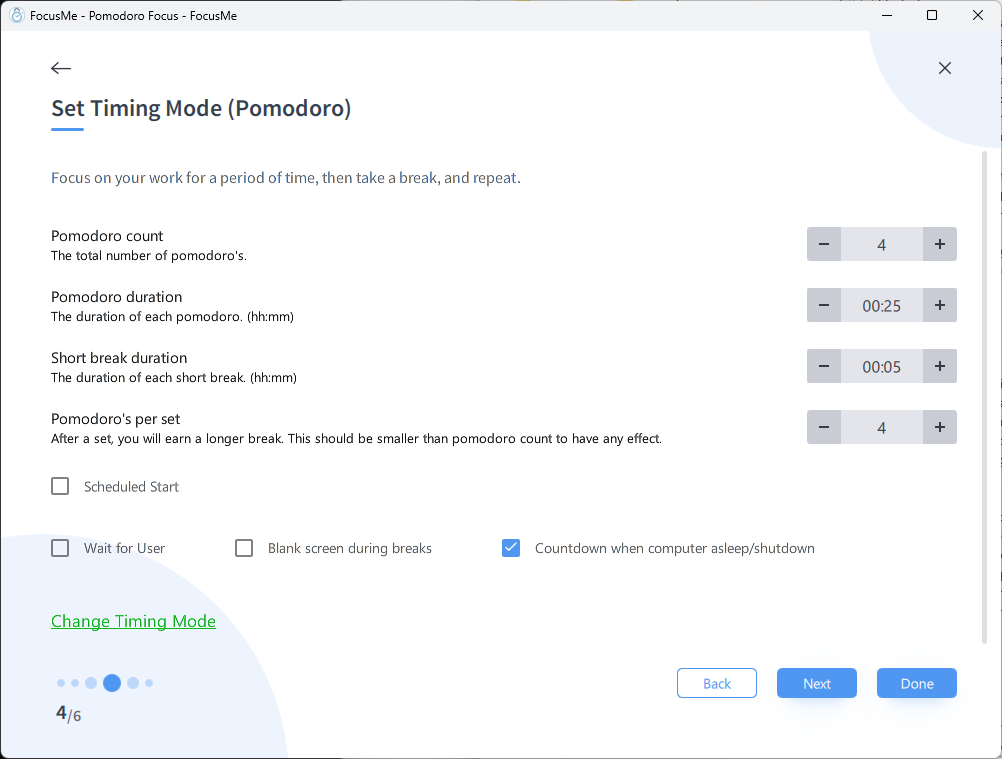
Structured work/break cycles based on the [Pomodoro Technique](https://en.wikipedia.org/wiki/Pomodoro_Technique). Alternates between focused work sessions and short breaks.
**Configuration:**
* **Work duration** — length of each focused sprint (default: 25 minutes)
* **Short break** — break between sprints (default: 5 minutes)
* **Long break** — extended break after a set number of sprints (default: 15 minutes)
* **Sprints before long break** — how many work periods before a long break (default: 4)
 **The classic Pomodoro cycle:**
1. Work for 25 minutes (targets blocked)
2. Break for 5 minutes (targets unblocked)
3. Repeat 4 times
4. Take a 15-minute long break
5. Start again
**Best for:**
* Maintaining sustained focus over long periods
* Preventing burnout during intensive work
* People who work well with structured time boxing
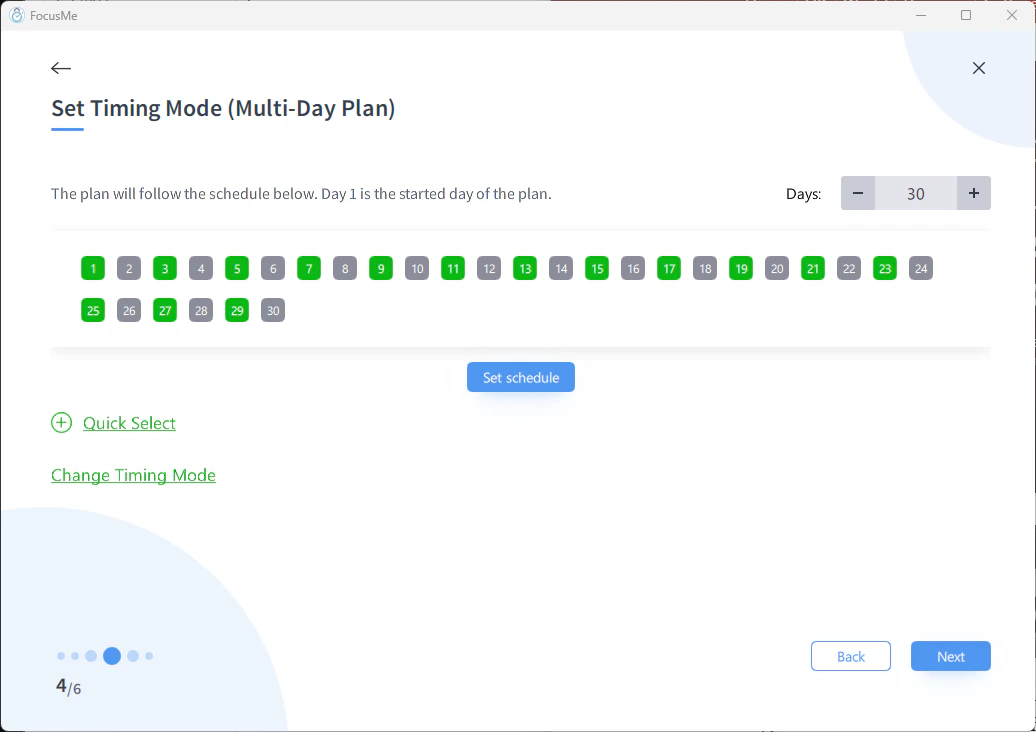
## Multi-Day Plan (Day Sequence)
Create a unique schedule for each day in a sequence. The plan advances through the days automatically.
**Configuration:**
* Define a sequence of days (e.g., Day 1 through Day 30)
* Set a unique schedule for each day using the day editor
* Quick-select presets: **odd days**, **even days**, or a **custom sequence** for rapid setup
* The plan progresses through the sequence automatically
**The classic Pomodoro cycle:**
1. Work for 25 minutes (targets blocked)
2. Break for 5 minutes (targets unblocked)
3. Repeat 4 times
4. Take a 15-minute long break
5. Start again
**Best for:**
* Maintaining sustained focus over long periods
* Preventing burnout during intensive work
* People who work well with structured time boxing
## Multi-Day Plan (Day Sequence)
Create a unique schedule for each day in a sequence. The plan advances through the days automatically.
**Configuration:**
* Define a sequence of days (e.g., Day 1 through Day 30)
* Set a unique schedule for each day using the day editor
* Quick-select presets: **odd days**, **even days**, or a **custom sequence** for rapid setup
* The plan progresses through the sequence automatically
 **Examples:**
* A 30-day digital detox challenge with gradually increasing blocked hours
* A study plan with different focus schedules for each day of revision
* An onboarding programme that adjusts restrictions as users build habits
**Best for:**
* Progressive challenges (gradually increasing restriction)
* Programmes with varying daily schedules
* Time-limited experiments
## Choosing the Right Schedule
| I want to... | Use |
| -------------------------------------------------- | ------------------- |
| Focus on demand, whenever I decide | **Focus Session** |
| Block distractions on a predictable weekly routine | **Weekly Schedule** |
| Work in structured sprint/break cycles | **Pomodoro** |
| Run a progressive multi-day programme | **Multi-Day Plan** |
## Combining Schedules
Since you can run multiple plans, you can layer different schedules:
* **Weekly Schedule** for baseline work-hour blocking (Mon-Fri 9-5)
* **Pomodoro** for structured deep work sessions within those hours
* **Focus Session** for ad-hoc evening focus when needed
**Examples:**
* A 30-day digital detox challenge with gradually increasing blocked hours
* A study plan with different focus schedules for each day of revision
* An onboarding programme that adjusts restrictions as users build habits
**Best for:**
* Progressive challenges (gradually increasing restriction)
* Programmes with varying daily schedules
* Time-limited experiments
## Choosing the Right Schedule
| I want to... | Use |
| -------------------------------------------------- | ------------------- |
| Focus on demand, whenever I decide | **Focus Session** |
| Block distractions on a predictable weekly routine | **Weekly Schedule** |
| Work in structured sprint/break cycles | **Pomodoro** |
| Run a progressive multi-day programme | **Multi-Day Plan** |
## Combining Schedules
Since you can run multiple plans, you can layer different schedules:
* **Weekly Schedule** for baseline work-hour blocking (Mon-Fri 9-5)
* **Pomodoro** for structured deep work sessions within those hours
* **Focus Session** for ad-hoc evening focus when needed