> ## Documentation Index
> Fetch the complete documentation index at: https://docs.focusme.com/llms.txt
> Use this file to discover all available pages before exploring further.
# Blocking Websites
> How to block distracting websites — individual sites, entire categories, or the whole internet.
FocusMe can block websites in two ways: **blacklist** specific sites or **block all websites** and whitelist exceptions.
## Block Some Websites (Blacklist)
The most common approach. You specify exactly which sites to block.
### Adding a Website
In Step 2 (Websites) of the Plan Wizard:
1. Click **Add Site**
2. Enter the domain — e.g., `reddit.com`, `tiktok.com`, `instagram.com`
3. The site is added to your blacklist
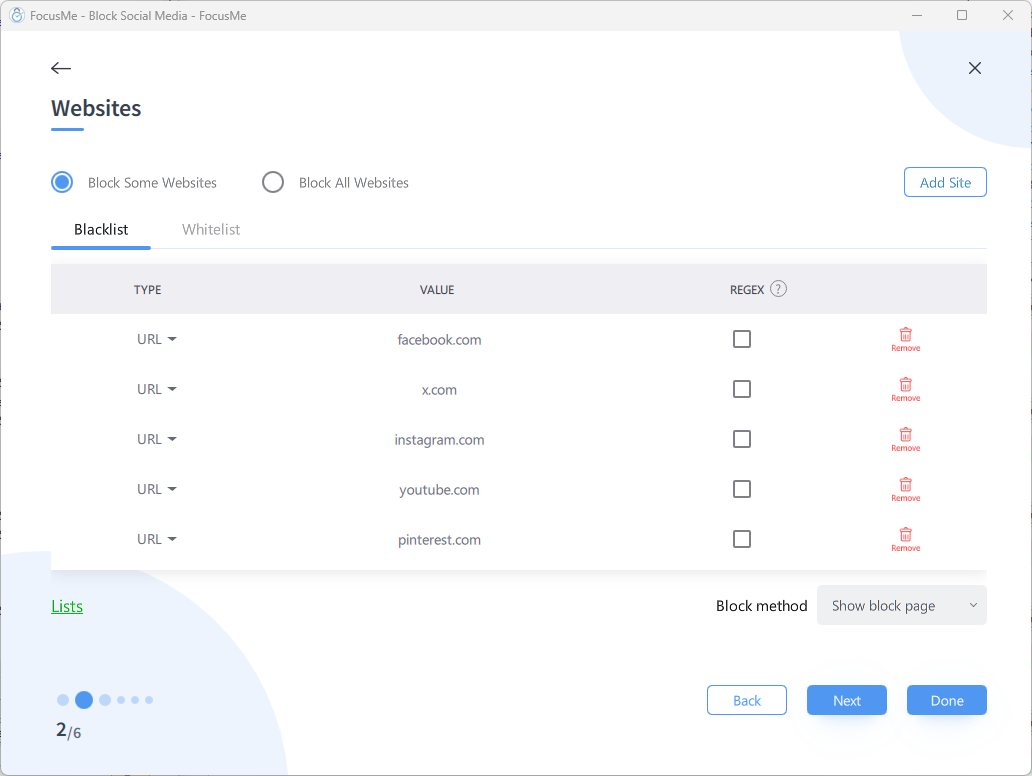
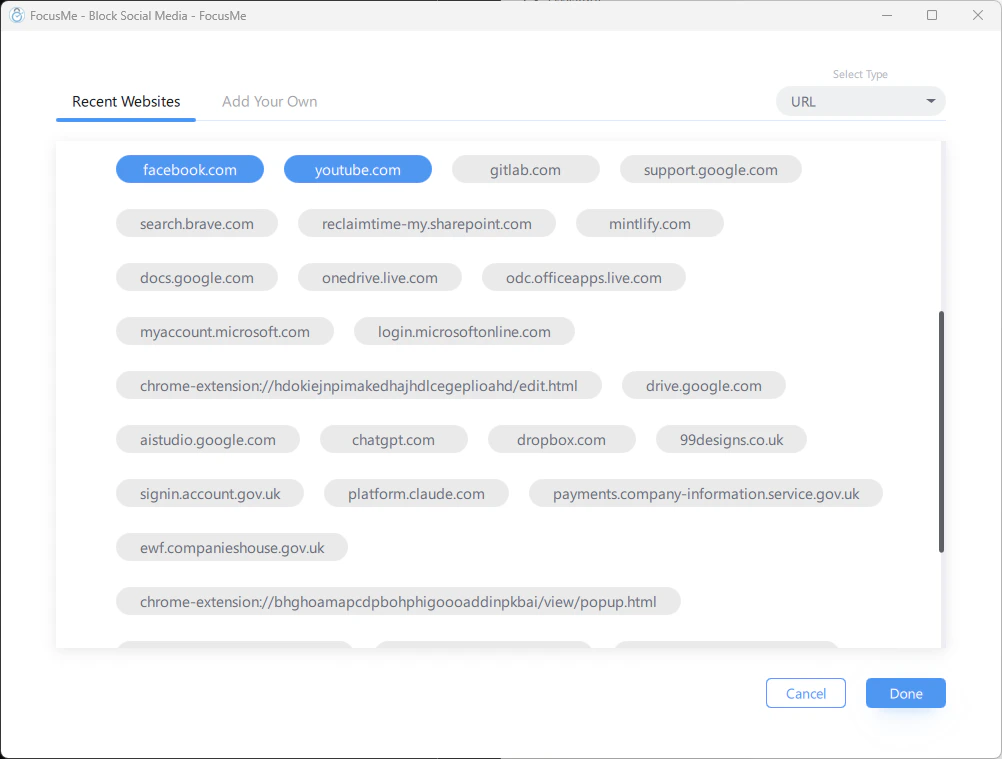 You don't need `https://` or `www.` — just the domain name. FocusMe automatically matches all variations including subdomains.
### Matching by URL vs Title
FocusMe can match websites two ways:
| Method | How It Works | Use When |
| --------- | -------------------------------------------- | ---------------------------------------------------------------- |
| **URL** | Matches the web address in the browser | You know the exact domain to block |
| **Title** | Matches text in the browser tab/window title | The site uses unpredictable URLs or you want to catch it by name |
**Example:** Blocking `youtube.com` by URL blocks the entire site. Blocking `YouTube` by title catches it even if accessed through an embedded player or redirect.
### Common Sites to Block
| Category | Sites |
| ------------ | ----------------------------------------------------------------------------------- |
| Social Media | `facebook.com`, `instagram.com`, `tiktok.com`, `x.com`, `reddit.com`, `threads.net` |
| Video | `youtube.com`, `netflix.com`, `twitch.tv`, `disneyplus.com` |
| News | `bbc.co.uk/news`, `cnn.com`, `dailymail.co.uk` |
| Shopping | `amazon.com`, `ebay.com`, `etsy.com` |
| Messaging | `web.whatsapp.com`, `discord.com`, `telegram.org` |
## Block All Websites (Whitelist Only)
For maximum focus, block the entire internet and only allow the sites you need for work.
1. In Step 2 of the Plan Wizard, choose **Block All Websites**
2. Add exceptions — sites that should remain accessible
3. Everything else is blocked
**Example:** Block all websites but allow `docs.google.com`, `github.com`, and `stackoverflow.com` for a coding session.
When blocking all websites, be sure to whitelist any sites you need for authentication (SSO providers, OAuth redirects) or your blocking plan could lock you out of work tools.
## Block Method
The **Block method** dropdown at the bottom of the Websites step controls what happens when you visit a blocked site:
You don't need `https://` or `www.` — just the domain name. FocusMe automatically matches all variations including subdomains.
### Matching by URL vs Title
FocusMe can match websites two ways:
| Method | How It Works | Use When |
| --------- | -------------------------------------------- | ---------------------------------------------------------------- |
| **URL** | Matches the web address in the browser | You know the exact domain to block |
| **Title** | Matches text in the browser tab/window title | The site uses unpredictable URLs or you want to catch it by name |
**Example:** Blocking `youtube.com` by URL blocks the entire site. Blocking `YouTube` by title catches it even if accessed through an embedded player or redirect.
### Common Sites to Block
| Category | Sites |
| ------------ | ----------------------------------------------------------------------------------- |
| Social Media | `facebook.com`, `instagram.com`, `tiktok.com`, `x.com`, `reddit.com`, `threads.net` |
| Video | `youtube.com`, `netflix.com`, `twitch.tv`, `disneyplus.com` |
| News | `bbc.co.uk/news`, `cnn.com`, `dailymail.co.uk` |
| Shopping | `amazon.com`, `ebay.com`, `etsy.com` |
| Messaging | `web.whatsapp.com`, `discord.com`, `telegram.org` |
## Block All Websites (Whitelist Only)
For maximum focus, block the entire internet and only allow the sites you need for work.
1. In Step 2 of the Plan Wizard, choose **Block All Websites**
2. Add exceptions — sites that should remain accessible
3. Everything else is blocked
**Example:** Block all websites but allow `docs.google.com`, `github.com`, and `stackoverflow.com` for a coding session.
When blocking all websites, be sure to whitelist any sites you need for authentication (SSO providers, OAuth redirects) or your blocking plan could lock you out of work tools.
## Block Method
The **Block method** dropdown at the bottom of the Websites step controls what happens when you visit a blocked site:
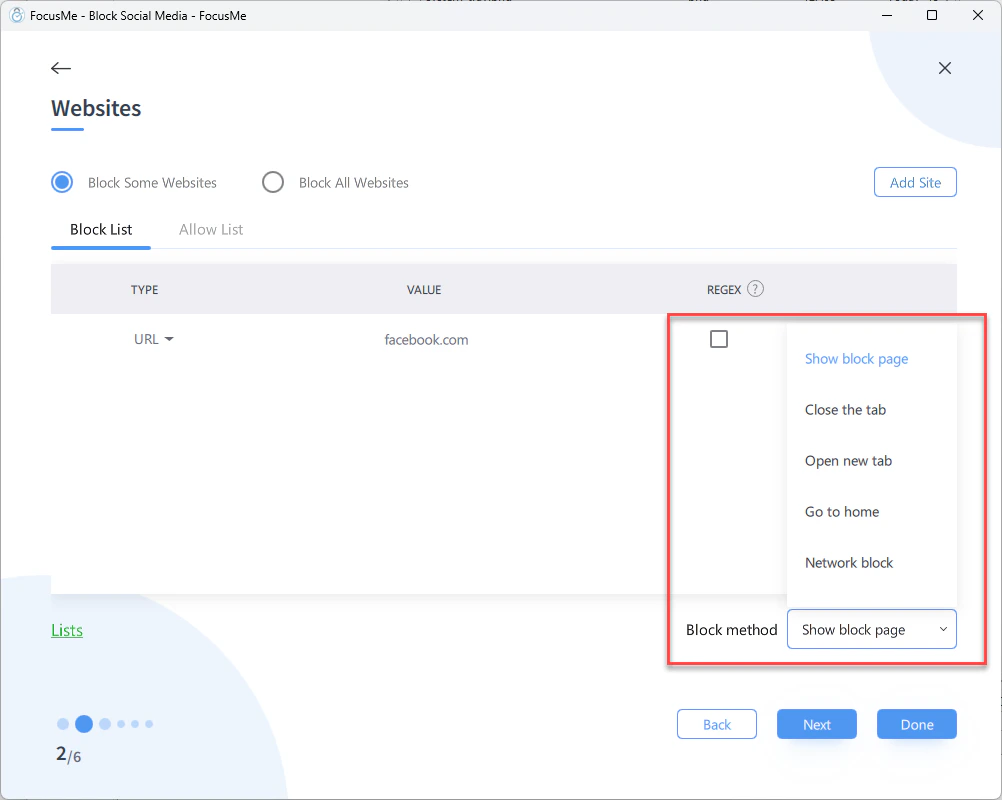 | Method | What Happens |
| ------------------- | ----------------------------------------------------------------------------------------------------- |
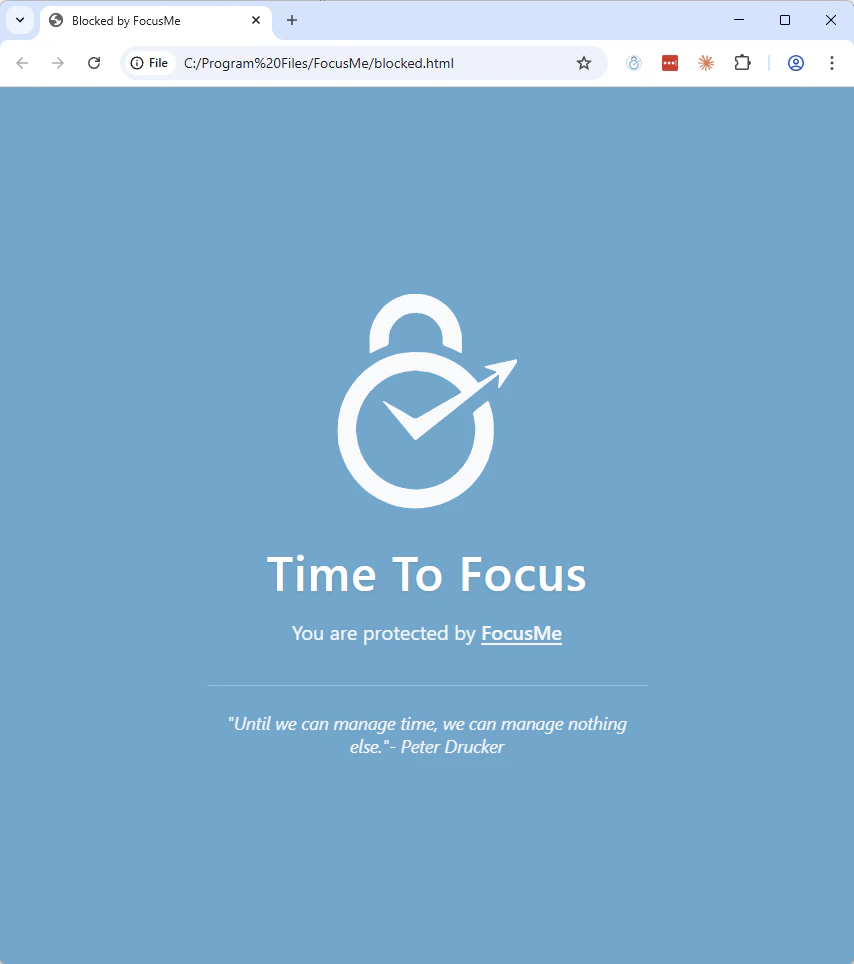
| **Show block page** | Replaces the page with a FocusMe blocked notification. The default and most visible option. |
| **Close the tab** | Silently closes the browser tab when a blocked site is detected. |
| **Open new tab** | Redirects to a new blank tab instead of showing the blocked site. |
| **Go to home** | Redirects to your browser's homepage. |
| **Network block** | A stronger blocking method — the page simply fails to load. Works even without the browser extension. |
| Method | What Happens |
| ------------------- | ----------------------------------------------------------------------------------------------------- |
| **Show block page** | Replaces the page with a FocusMe blocked notification. The default and most visible option. |
| **Close the tab** | Silently closes the browser tab when a blocked site is detected. |
| **Open new tab** | Redirects to a new blank tab instead of showing the blocked site. |
| **Go to home** | Redirects to your browser's homepage. |
| **Network block** | A stronger blocking method — the page simply fails to load. Works even without the browser extension. |
 Regardless of the method chosen, the site remains inaccessible — you cannot bypass it by:
* Opening an incognito/private window
* Using a different browser
* Accessing a cached version
* Using a URL shortener or redirect
## Browser Extension
The FocusMe browser extension provides the most reliable website blocking. It communicates directly with the desktop app and can:
* Detect URLs in real time
* Block pages before they load
* Work across all tabs and windows
Install it from [focusme.com/download/addon](https://focusme.com/download/addon/) — the link automatically detects your browser. Works with Chrome, Edge, Brave, Opera, Vivaldi, and Firefox.
## Partial Blocking
You can block specific parts of a website while allowing the rest. For example:
* Block `youtube.com/shorts` but allow regular YouTube videos
* Block `reddit.com/r/gaming` but allow other subreddits
* Block `facebook.com` but allow `facebook.com/messages`
To do this, add the specific URL path rather than just the domain.
[See the Partial Blocking guide →](/guides/partially-block-websites)
## Punisher
For Block plans, you can enable the **Punisher** to add escalating consequences when you repeatedly try to visit blocked sites. Instead of just blocking, the Punisher extends blocking time with each reoffence.
[Learn more about the Punisher →](/concepts/plans-overview#punisher)
## Tips
* **Start broad, add exceptions.** It's easier to block everything and whitelist what you need than to chase every distracting site individually.
* **Use title matching for stubborn sites.** Some sites use subdomains or redirects that can slip past URL matching. Title matching catches them regardless.
* **Combine with app blocking.** If you block `youtube.com` but the YouTube desktop app is installed, block that too.
* **Use RegEx for patterns.** If you need to block sites matching a pattern (e.g., all gaming sites), [Regular Expressions](/advanced/regex) give you powerful matching.
Regardless of the method chosen, the site remains inaccessible — you cannot bypass it by:
* Opening an incognito/private window
* Using a different browser
* Accessing a cached version
* Using a URL shortener or redirect
## Browser Extension
The FocusMe browser extension provides the most reliable website blocking. It communicates directly with the desktop app and can:
* Detect URLs in real time
* Block pages before they load
* Work across all tabs and windows
Install it from [focusme.com/download/addon](https://focusme.com/download/addon/) — the link automatically detects your browser. Works with Chrome, Edge, Brave, Opera, Vivaldi, and Firefox.
## Partial Blocking
You can block specific parts of a website while allowing the rest. For example:
* Block `youtube.com/shorts` but allow regular YouTube videos
* Block `reddit.com/r/gaming` but allow other subreddits
* Block `facebook.com` but allow `facebook.com/messages`
To do this, add the specific URL path rather than just the domain.
[See the Partial Blocking guide →](/guides/partially-block-websites)
## Punisher
For Block plans, you can enable the **Punisher** to add escalating consequences when you repeatedly try to visit blocked sites. Instead of just blocking, the Punisher extends blocking time with each reoffence.
[Learn more about the Punisher →](/concepts/plans-overview#punisher)
## Tips
* **Start broad, add exceptions.** It's easier to block everything and whitelist what you need than to chase every distracting site individually.
* **Use title matching for stubborn sites.** Some sites use subdomains or redirects that can slip past URL matching. Title matching catches them regardless.
* **Combine with app blocking.** If you block `youtube.com` but the YouTube desktop app is installed, block that too.
* **Use RegEx for patterns.** If you need to block sites matching a pattern (e.g., all gaming sites), [Regular Expressions](/advanced/regex) give you powerful matching.