> ## Documentation Index
> Fetch the complete documentation index at: https://docs.focusme.com/llms.txt
> Use this file to discover all available pages before exploring further.
# Uninstall FocusMe
> How to remove FocusMe from your computer.
## Windows
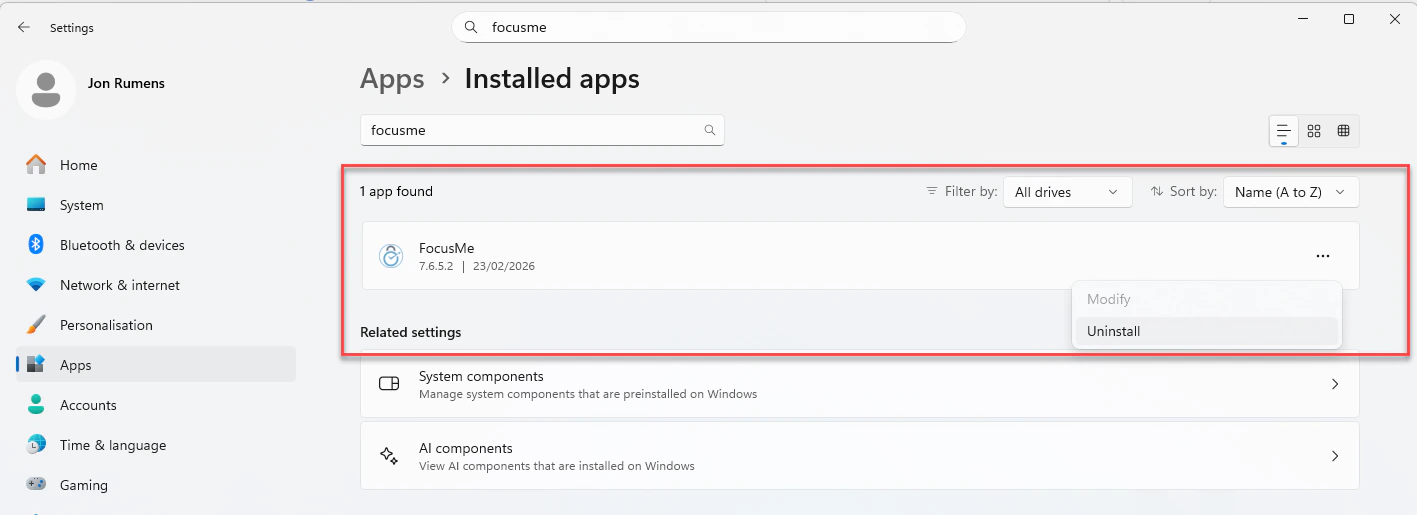 1. Open **Settings → Apps → Installed Apps**
2. Search for "FocusMe"
3. Click **Uninstall** and follow the prompts
Alternatively, run the uninstaller from the Start Menu or the installation directory.
If you have plans with **Enforced** protection active, you may need to wait for them to end before uninstalling. This is by design — Enforced plans are meant to be tamper-resistant.
## macOS
1. Open **Finder → Applications**
2. Drag **FocusMe** to the Trash
3. Empty the Trash
## Linux
Run the uninstall script:
```bash theme={null}
sudo /Applications/FocusMe/focusme_uninstall_linux.sh
```
This removes the application and desktop integration files.
## After Uninstalling
Uninstalling removes:
* The FocusMe application
* Auto-start entries
* Desktop shortcuts and Start Menu entries
Uninstalling does **not** remove:
* Your settings and plan data (stored in user profile / registry)
* The browser extension (remove it separately from your browser)
* Your FocusMe account (managed at [focusme.com](https://focusme.com))
1. Open **Settings → Apps → Installed Apps**
2. Search for "FocusMe"
3. Click **Uninstall** and follow the prompts
Alternatively, run the uninstaller from the Start Menu or the installation directory.
If you have plans with **Enforced** protection active, you may need to wait for them to end before uninstalling. This is by design — Enforced plans are meant to be tamper-resistant.
## macOS
1. Open **Finder → Applications**
2. Drag **FocusMe** to the Trash
3. Empty the Trash
## Linux
Run the uninstall script:
```bash theme={null}
sudo /Applications/FocusMe/focusme_uninstall_linux.sh
```
This removes the application and desktop integration files.
## After Uninstalling
Uninstalling removes:
* The FocusMe application
* Auto-start entries
* Desktop shortcuts and Start Menu entries
Uninstalling does **not** remove:
* Your settings and plan data (stored in user profile / registry)
* The browser extension (remove it separately from your browser)
* Your FocusMe account (managed at [focusme.com](https://focusme.com))