> ## Documentation Index
> Fetch the complete documentation index at: https://docs.focusme.com/llms.txt
> Use this file to discover all available pages before exploring further.
# Usage Statistics
> Track how you spend your screen time with FocusMe's built-in activity monitoring.
FocusMe tracks which applications and websites you use and for how long. The Statistics tab gives you a clear picture of your screen time habits.
## Viewing Statistics
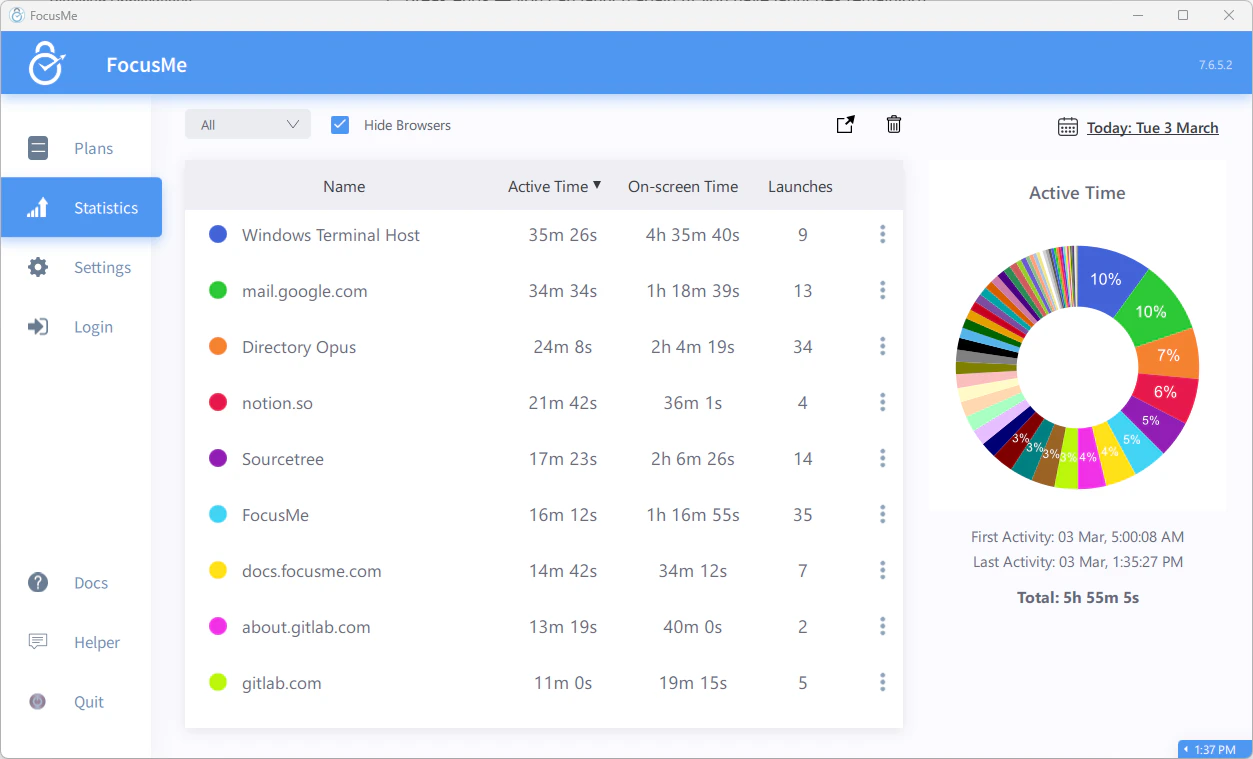 Click the **Statistics** tab in the main FocusMe window. You'll see a breakdown of your activity.
### Time Periods
Use the date range selector to view statistics for:
* **Today** — current day's activity
* **This Week** — current week
* **This Month** — current month
* **Custom** — pick any date range
### View Modes
Switch between three views:
| View | Shows |
| ---------------- | -------------------------------------------------------------------------------------------------------------------------------------------------------------------------------------------------- |
| **Active Time** | Time you actively spent using each app/website — the window was in the foreground and you were interacting with it (keyboard/mouse activity). After 30 seconds of inactivity, time stops counting. |
| **Visible Time** | Total time each app/website was visible on screen, even if it wasn't your active window. Useful for tracking apps running passively on a second monitor (e.g., music, video, chat). |
| **Launches** | Number of times each app/website was opened |
### Sorting
Sort the statistics list by:
* **Focus Time** (default) — most-used apps first
* **Target name** — alphabetical
* **Visible Time** — most screen time first
* **Launches** — most frequently opened first
## Filtering
* **Hide browsers** — toggle to exclude browser processes and show only application usage
* **Target filter** — include or exclude specific apps/websites from the view
## What Gets Tracked
FocusMe records:
* Which apps and websites you use
* How long each is active or visible
* When apps are launched and closed
* First and last activity timestamps for each target
Statistics are stored locally on your device. They are not sent to our server.
## Using Statistics Effectively
1. **Identify your biggest time sinks** — sort by Active Time to see where your hours go
2. **Set baselines before blocking** — track for a week without any plans to understand your habits, then set realistic limits
3. **Verify your blocks are working** — if a blocked app still shows usage time, check your plan configuration
4. **Track progress** — compare weekly statistics to see if your screen time is trending down
Click the **Statistics** tab in the main FocusMe window. You'll see a breakdown of your activity.
### Time Periods
Use the date range selector to view statistics for:
* **Today** — current day's activity
* **This Week** — current week
* **This Month** — current month
* **Custom** — pick any date range
### View Modes
Switch between three views:
| View | Shows |
| ---------------- | -------------------------------------------------------------------------------------------------------------------------------------------------------------------------------------------------- |
| **Active Time** | Time you actively spent using each app/website — the window was in the foreground and you were interacting with it (keyboard/mouse activity). After 30 seconds of inactivity, time stops counting. |
| **Visible Time** | Total time each app/website was visible on screen, even if it wasn't your active window. Useful for tracking apps running passively on a second monitor (e.g., music, video, chat). |
| **Launches** | Number of times each app/website was opened |
### Sorting
Sort the statistics list by:
* **Focus Time** (default) — most-used apps first
* **Target name** — alphabetical
* **Visible Time** — most screen time first
* **Launches** — most frequently opened first
## Filtering
* **Hide browsers** — toggle to exclude browser processes and show only application usage
* **Target filter** — include or exclude specific apps/websites from the view
## What Gets Tracked
FocusMe records:
* Which apps and websites you use
* How long each is active or visible
* When apps are launched and closed
* First and last activity timestamps for each target
Statistics are stored locally on your device. They are not sent to our server.
## Using Statistics Effectively
1. **Identify your biggest time sinks** — sort by Active Time to see where your hours go
2. **Set baselines before blocking** — track for a week without any plans to understand your habits, then set realistic limits
3. **Verify your blocks are working** — if a blocked app still shows usage time, check your plan configuration
4. **Track progress** — compare weekly statistics to see if your screen time is trending down