> ## Documentation Index
> Fetch the complete documentation index at: https://docs.focusme.com/llms.txt
> Use this file to discover all available pages before exploring further.
# Regular Expressions (RegEx)
> Use pattern matching to block groups of websites or applications with a single rule.
Regular Expressions (RegEx) let you match patterns instead of exact strings. A single RegEx entry can block entire categories of sites or apps.
## Enabling RegEx
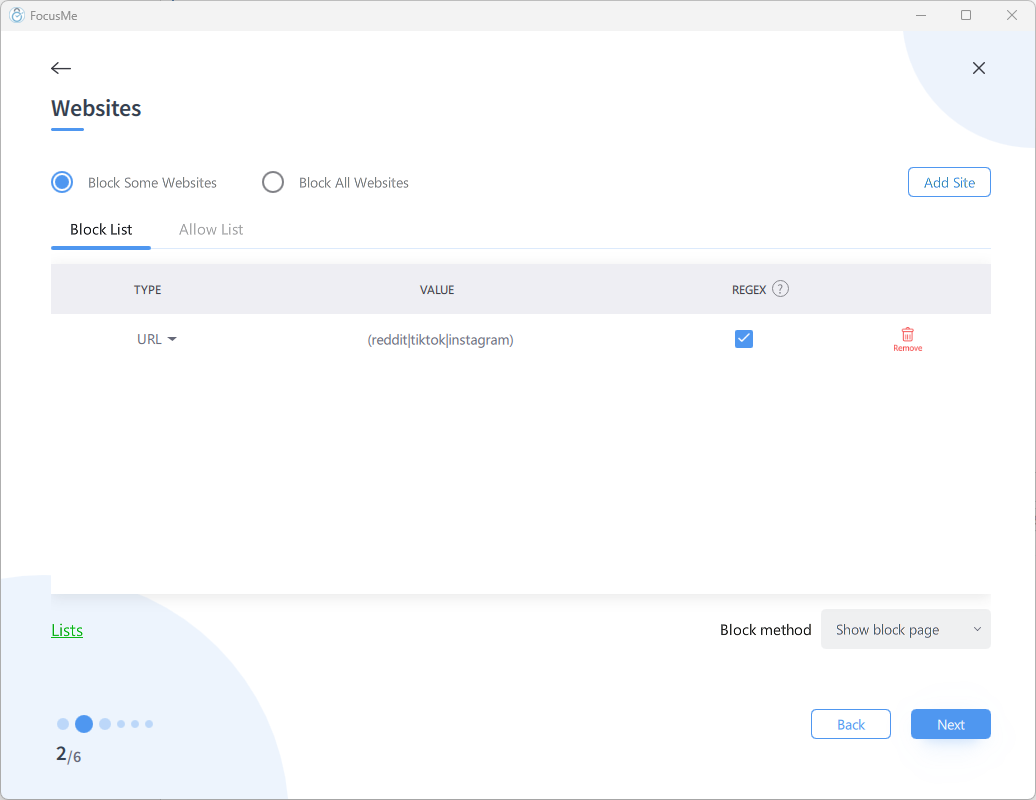 When adding a website or application entry in the Plan Wizard:
1. Enter your pattern in the text field
2. **Check the RegEx box** on that entry
3. FocusMe will treat the entry as a regular expression instead of a literal string
If you forget to check the RegEx box, FocusMe treats your pattern as a plain text match. The entry won't work as expected.
FocusMe's RegEx matching is **always case-insensitive** — you don't need to add `(?i)` to your patterns.
## Essential Patterns
### Word Boundaries
Use `\b` to match whole words only:
```
\bsteam\b
```
Matches: `store.steampowered.com`
Does **not** match: `upstream.example.com` (because "steam" is part of "upstream")
### OR Matching
Use `|` (pipe) to match any of several options:
```
(reddit|tiktok|instagram)
```
Matches any URL or title containing "reddit", "tiktok", or "instagram".
### Combining Patterns
```
\b(facebook|instagram|tiktok|x\.com|reddit|threads)\b
```
This single entry blocks all major social media platforms. Note that `.` is escaped as `\.` in `x\.com` because `.` in RegEx matches any character.
## Practical Examples
### Block All Gaming Platforms
```
\b(steam|epicgames|origin|ea\.com|gog\.com|battle\.net)\b
```
### Block All News Sites
```
\b(bbc\.co\.uk/news|cnn\.com|dailymail|theguardian|nytimes)\b
```
### Block YouTube Shorts and Reels
```
(youtube\.com/shorts|instagram\.com/reels|facebook\.com/reel)
```
### Block All Subdomains of a Domain
```
(.+\.)?example\.com
```
Matches `example.com`, `www.example.com`, `mail.example.com`, etc.
## RegEx Quick Reference
| Pattern | Meaning | Example |
| -------- | --------------------------------------------------- | ------------------------------------------ |
| `.` | Any single character | `a.c` matches "abc", "a1c" |
| `*` | Zero or more of preceding | `ab*c` matches "ac", "abc", "abbc" |
| `+` | One or more of preceding | `ab+c` matches "abc", "abbc" but not "ac" |
| `?` | Zero or one of preceding | `ab?c` matches "ac", "abc" |
| `\b` | Word boundary | `\bcat\b` matches "cat" but not "category" |
| `(a\|b)` | Either a or b | `(cat\|dog)` matches "cat" or "dog" |
| `\.` | Literal dot | `google\.com` matches "google.com" |
| `(?i)` | Case insensitive (built-in — not needed in FocusMe) | `hello` matches "HELLO" automatically |
| `[a-z]` | Character range | `[0-9]+` matches one or more digits |
## Common Mistakes
1. **Forgetting the RegEx checkbox** — your pattern is treated as plain text
2. **Unescaped dots** — `google.com` in RegEx matches `googleXcom` too. Use `google\.com`
3. **Too broad a pattern** — `game` blocks `game.com` but also `gamestop.com` and any URL with "game" in it. Use word boundaries `\b` to be precise
4. **Testing** — try your pattern on a site like [regex101.com](https://regex101.com) before adding it to FocusMe
When adding a website or application entry in the Plan Wizard:
1. Enter your pattern in the text field
2. **Check the RegEx box** on that entry
3. FocusMe will treat the entry as a regular expression instead of a literal string
If you forget to check the RegEx box, FocusMe treats your pattern as a plain text match. The entry won't work as expected.
FocusMe's RegEx matching is **always case-insensitive** — you don't need to add `(?i)` to your patterns.
## Essential Patterns
### Word Boundaries
Use `\b` to match whole words only:
```
\bsteam\b
```
Matches: `store.steampowered.com`
Does **not** match: `upstream.example.com` (because "steam" is part of "upstream")
### OR Matching
Use `|` (pipe) to match any of several options:
```
(reddit|tiktok|instagram)
```
Matches any URL or title containing "reddit", "tiktok", or "instagram".
### Combining Patterns
```
\b(facebook|instagram|tiktok|x\.com|reddit|threads)\b
```
This single entry blocks all major social media platforms. Note that `.` is escaped as `\.` in `x\.com` because `.` in RegEx matches any character.
## Practical Examples
### Block All Gaming Platforms
```
\b(steam|epicgames|origin|ea\.com|gog\.com|battle\.net)\b
```
### Block All News Sites
```
\b(bbc\.co\.uk/news|cnn\.com|dailymail|theguardian|nytimes)\b
```
### Block YouTube Shorts and Reels
```
(youtube\.com/shorts|instagram\.com/reels|facebook\.com/reel)
```
### Block All Subdomains of a Domain
```
(.+\.)?example\.com
```
Matches `example.com`, `www.example.com`, `mail.example.com`, etc.
## RegEx Quick Reference
| Pattern | Meaning | Example |
| -------- | --------------------------------------------------- | ------------------------------------------ |
| `.` | Any single character | `a.c` matches "abc", "a1c" |
| `*` | Zero or more of preceding | `ab*c` matches "ac", "abc", "abbc" |
| `+` | One or more of preceding | `ab+c` matches "abc", "abbc" but not "ac" |
| `?` | Zero or one of preceding | `ab?c` matches "ac", "abc" |
| `\b` | Word boundary | `\bcat\b` matches "cat" but not "category" |
| `(a\|b)` | Either a or b | `(cat\|dog)` matches "cat" or "dog" |
| `\.` | Literal dot | `google\.com` matches "google.com" |
| `(?i)` | Case insensitive (built-in — not needed in FocusMe) | `hello` matches "HELLO" automatically |
| `[a-z]` | Character range | `[0-9]+` matches one or more digits |
## Common Mistakes
1. **Forgetting the RegEx checkbox** — your pattern is treated as plain text
2. **Unescaped dots** — `google.com` in RegEx matches `googleXcom` too. Use `google\.com`
3. **Too broad a pattern** — `game` blocks `game.com` but also `gamestop.com` and any URL with "game" in it. Use word boundaries `\b` to be precise
4. **Testing** — try your pattern on a site like [regex101.com](https://regex101.com) before adding it to FocusMe