> ## Documentation Index
> Fetch the complete documentation index at: https://docs.focusme.com/llms.txt
> Use this file to discover all available pages before exploring further.
# Browser Extension
> Install and configure the FocusMe browser extension for reliable website blocking.
The FocusMe browser extension works alongside the desktop app to provide reliable, real-time website blocking. While the desktop app can block websites on its own, the extension makes blocking faster and more accurate.
## Why Use the Extension?
The extension improves website detection. Install it for the best blocking experience.
## Supported Browsers
The extension is available for all major Chromium-based browsers and Firefox:
| Browser | Install From |
| -------------- | ----------------------------- |
| Google Chrome | Chrome Web Store |
| Microsoft Edge | Chrome Web Store (compatible) |
| Brave | Chrome Web Store (compatible) |
| Opera | Chrome Web Store (compatible) |
| Vivaldi | Chrome Web Store (compatible) |
| Firefox | Firefox Add-ons |
## Installation
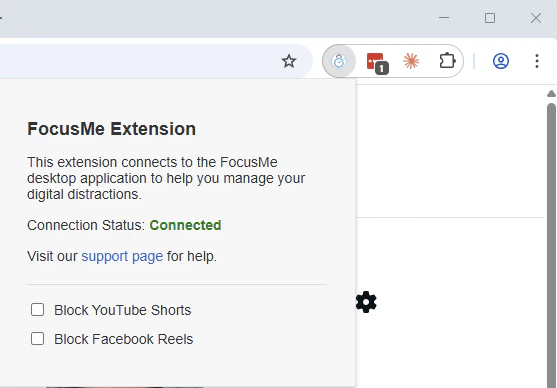 1. Open your browser and visit the appropriate store
2. Go to [focusme.com/download/addon](https://focusme.com/download/addon/) — it automatically detects your browser
3. Click **Add to Browser** / **Install**
4. The extension icon appears in your browser toolbar
5. The extension automatically connects to the FocusMe desktop app
The extension connects to the FocusMe desktop app. The desktop app must be running for the extension to work.
## Troubleshooting
### Extension not connecting
1. Make sure the FocusMe desktop app is running
2. Try restarting your browser
3. Check that the extension is enabled in your browser's extension settings
4. Reinstalling FocusMe should fix any connection issues.
### Websites still not blocked
See the [troubleshooting guide](/guides/troubleshoot-websites-not-blocked) for comprehensive steps.
1. Open your browser and visit the appropriate store
2. Go to [focusme.com/download/addon](https://focusme.com/download/addon/) — it automatically detects your browser
3. Click **Add to Browser** / **Install**
4. The extension icon appears in your browser toolbar
5. The extension automatically connects to the FocusMe desktop app
The extension connects to the FocusMe desktop app. The desktop app must be running for the extension to work.
## Troubleshooting
### Extension not connecting
1. Make sure the FocusMe desktop app is running
2. Try restarting your browser
3. Check that the extension is enabled in your browser's extension settings
4. Reinstalling FocusMe should fix any connection issues.
### Websites still not blocked
See the [troubleshooting guide](/guides/troubleshoot-websites-not-blocked) for comprehensive steps.